
Skip to content
Menu
SteamAH
  • Cheat
  • Guide
  • Tips
  • Privacy Policy
  • Abuse
SteamAH
Valheim How to Fix Multiplayer Lag

Valheim Open Console Command March 2021

Posted on March 23, 2021

For Valheim players, this guide will explain how to open Console Commands in-game. No Downloads or extra instals required.


Follow these instructions below

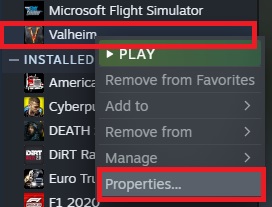
1. Go to Library and right click Valheim and click on Properties
Valheim Open Console Command March 2021

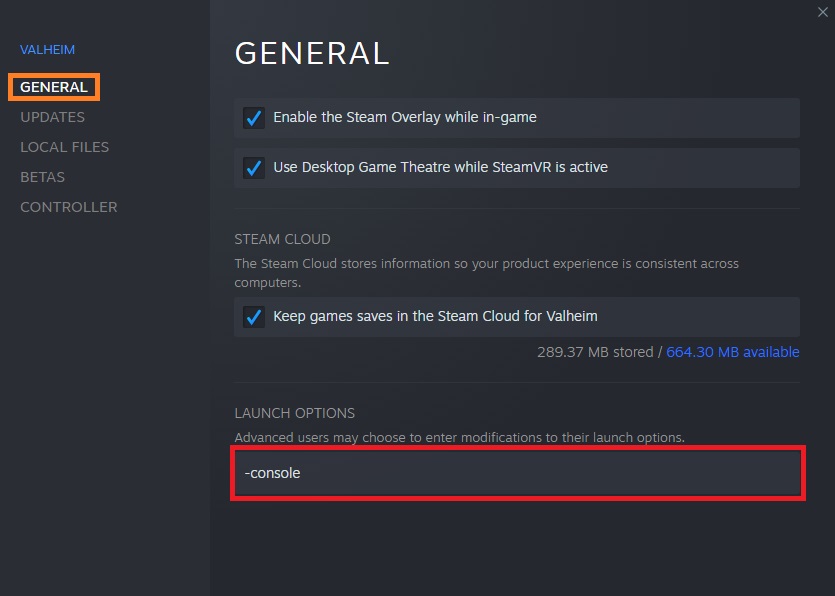
2. Go to General then at “Launch Options” and add:
-console
Valheim Open Console Command March 2021

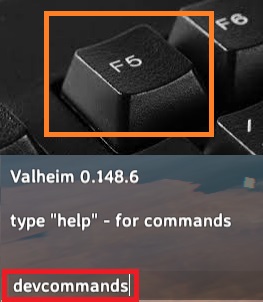
3. Now in-game press “F5” and add:
devcommands
Valheim Open Console Command March 2021

That’s all we are sharing today in Valheim Open Console Command March 2021, if you have anything to add, please feel free to leave a comment below, and we’ll see you soon.
Credit to Scorpidoo

Related Posts:

  • Valheim FPS Fix Picture Guide
  • Valheim How to Flatten an Area in One Command
  • Valheim Simple Commands for FPS Boost
  • Valheim How to Save and Load Your Constructions
  • Valheim How to Connect to Servers By IP

Leave a Reply Cancel reply

Your email address will not be published. Required fields are marked *

Disclaimer

All content cited is derived from their respective sources. If you think we have used your content without permission, Please go to the Abuse Page to contact us and we will be taking it seriously.

Recent Posts

  • The Cozy Funemployment: 100% Achievement Guide
  • KORRIDOR: Catacombs, Keys, Runes and All Door Routes
  • just volleyball: Character Codes List and Import Guide
  • just volleyball: Movement Guide for PC
  • Zombies Aren’t Real: The Sardines Strategy to Win Every Map

Advertisement

©2026 SteamAH | Powered by SuperbThemes & WordPress