
Skip to content
Menu
SteamAH
  • Cheat
  • Guide
  • Tips
  • Privacy Policy
  • Abuse
SteamAH

STAR WARS™: Squadrons Logitech X52 Layout

Posted on October 3, 2020

For STAR WARS™: Squadrons players, I mapped out the button numbers for Star Wars Squadrons on Logitech’s X52 HOTAS. Let’s check it out.

I was amazed that the buttons under the Multi-Clock display are programmable, this provides 8 extra functions!

X52 Configuration Guide
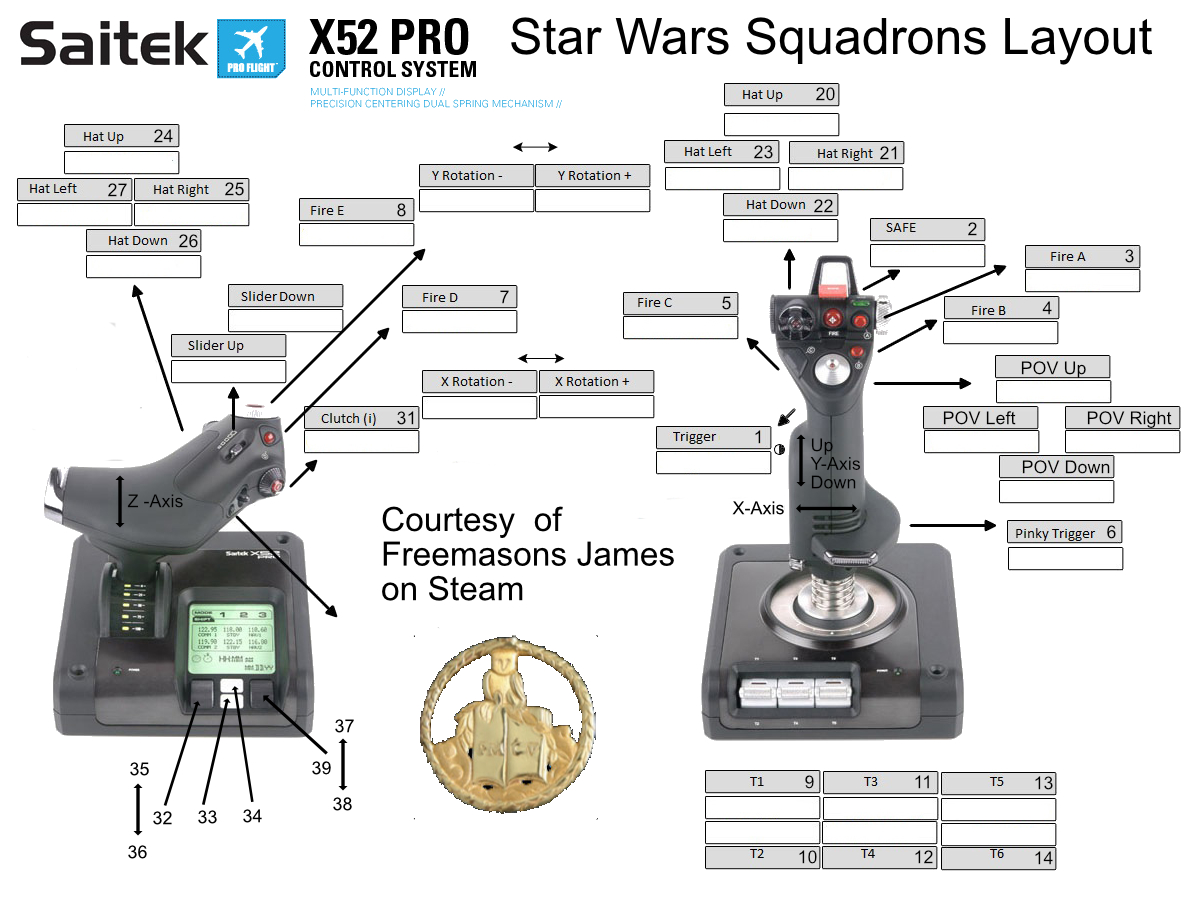
STAR WARS™: Squadrons Logitech X52 Layout


That’s all we are sharing today in STAR WARS™: Squadrons Logitech X52 Layout, if there are anything you want to add please feel free to leave a comment below and we’ll see you soon.
Credit to Freemasons

MORE GAME GUIDES FOR YOU

Related Posts:

  • STAR WARS™: Squadrons How To Disable Motion Blur
  • STAR WARS™: Squadrons Ship Builder Guide
  • STAR WARS™: Squadrons How to Play on Windows 7
  • STAR WARS™: Squadrons How to Never Get Hit or Targeted
  • STAR WARS™: Squadrons Deadzone Fix for Thrustmaster Joysticks

Leave a Reply Cancel reply

Your email address will not be published. Required fields are marked *

Disclaimer

All content cited is derived from their respective sources. If you think we have used your content without permission, Please go to the Abuse Page to contact us and we will be taking it seriously.

Recent Posts

  • My Winter Car: Save Files for 100% Rivvet
  • Anomalous Coffee Machine 2: 100% Save Files
  • Love n Life: Happy Student – 100% Save
  • Monument Valley 3: 100% Save Files
  • Quake 4: All Story Mode Save Files
©2026 SteamAH | Powered by SuperbThemes & WordPress