
Skip to content
Menu
SteamAH
  • Cheat
  • Guide
  • Tips
  • Privacy Policy
  • Abuse
SteamAH

Romance in the Cityscape: How to Fix Unable to initialize Vulkan video driver Error

Posted on February 27, 2024

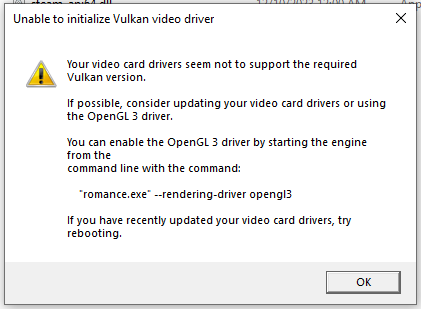
This guide is intended for you if the game does not run on your computer and gives the error “Unable to initialize Vulkan video driver”


The error
Steps to fix the error

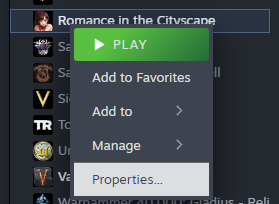
1. Open the game properties
2. Find the launch options line
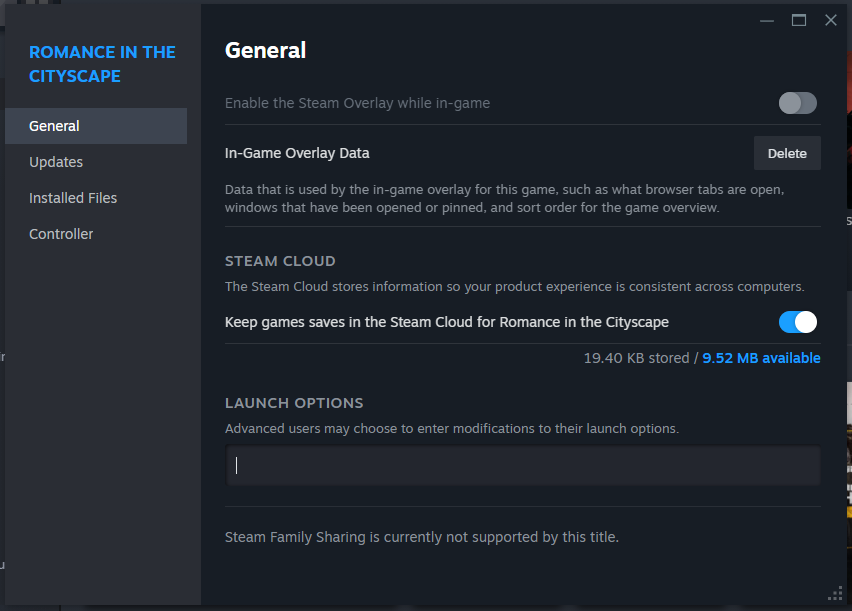
3. Paste “–rendering-driver opengl3” into this line to get it as shown in the screenshot
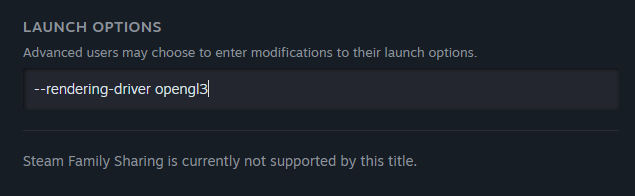
4. Now just run the game as usual

Done!

Thanks to gugdun for their excellent guide; all credit belongs to their effort. If this guide helps you, please support and rate it here. Enjoy the game.

MORE GAME GUIDES FOR YOU

Related Posts:

  • Romance in the Cityscape: How to Beat the Library Level (“Pro” Achievement Guide)

Leave a Reply Cancel reply

Your email address will not be published. Required fields are marked *

Disclaimer

All content cited is derived from their respective sources. If you think we have used your content without permission, Please go to the Abuse Page to contact us and we will be taking it seriously.

Recent Posts

  • Boba Cafe Simulator: NPC’s Like & Dislike Drinks
  • The Life and Suffering of Prince Jerian: Some Useful Tips
  • The Life and Suffering of Prince Jerian: Key Events Guide
  • hololive Dreams: How to Fix Game Crashing, Not Launching, or Black Screen
  • Halo: The Master Chief Collection – How to Fix Blurry Graphics Issue
©2026 SteamAH | Powered by SuperbThemes & WordPress