
Skip to content
Menu
SteamAH
  • Cheat
  • Guide
  • Tips
  • Privacy Policy
  • Abuse
SteamAH

Armed to the Gears: How to Select Difficulty

Posted on March 7, 2019

How to slect the game difficulty and how does it change the gameplay.


Game Difficulty

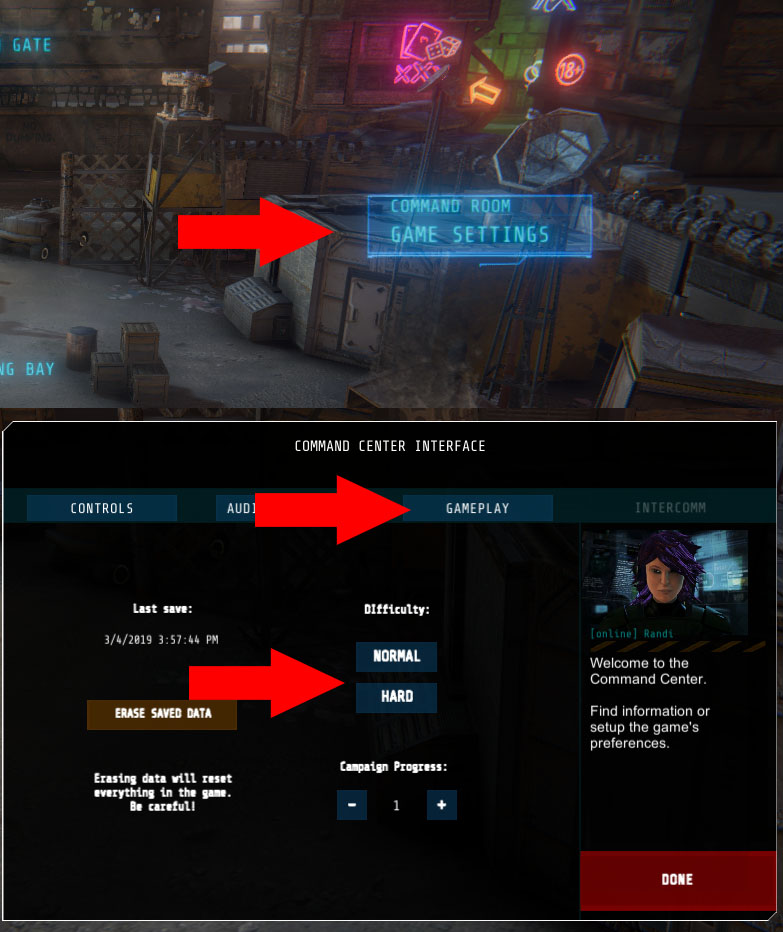
Armed to the gears has two game difficulties: Normal and Hard. To switch between them, go to the Game Settings, Gameplay tab, Difficulty:
Armed to the Gears: How to Select Difficulty
The Hard Difficulty will change some aspects of gameplay, such as:

  • Wasting your mech will reset the main weapons to machine gun and grenade launcher, and warhead amount to zero;
  • Enemy spawn amount will be increased;
  • Enemies will have more life and strength.

Written by Raf

Related Posts:

  • Armed to the Gears: How to Improve Performance

Leave a Reply Cancel reply

Your email address will not be published. Required fields are marked *

Disclaimer

All content cited is derived from their respective sources. If you think we have used your content without permission, Please go to the Abuse Page to contact us and we will be taking it seriously.

Recent Posts

  • The Cozy Funemployment: Tips and Guide for All Endings
  • The Cozy Funemployment: 100% Achievement Guide
  • KORRIDOR: Catacombs, Keys, Runes and All Door Routes
  • just volleyball: Character Codes List and Import Guide
  • just volleyball: Movement Guide for PC

Advertisement

©2026 SteamAH | Powered by SuperbThemes & WordPress