
Skip to content
Menu
SteamAH
  • Cheat
  • Guide
  • Tips
  • Privacy Policy
  • Abuse
SteamAH

Super Monkey Ball Banana Mania How to Enable Classic Soundtrack

Posted on October 5, 2021

If you want to play Super Monkey Ball Banana Mania with the classic soundtrack on, this guide will show you how to enable the classic soundtrack

Enabling the classic soundtrack

1.) Purchase the Super Monkey Ball Banana Mania – Classic Soundtrack from the steam store
https://store.steampowered.com/app/1606090/Super_Monkey_Ball_Banana_Mania__Classic_Soundtrack/?snr=1_5_1100__1100
2.) Install it
3.) Launch Super Monkey Ball Banana Mania
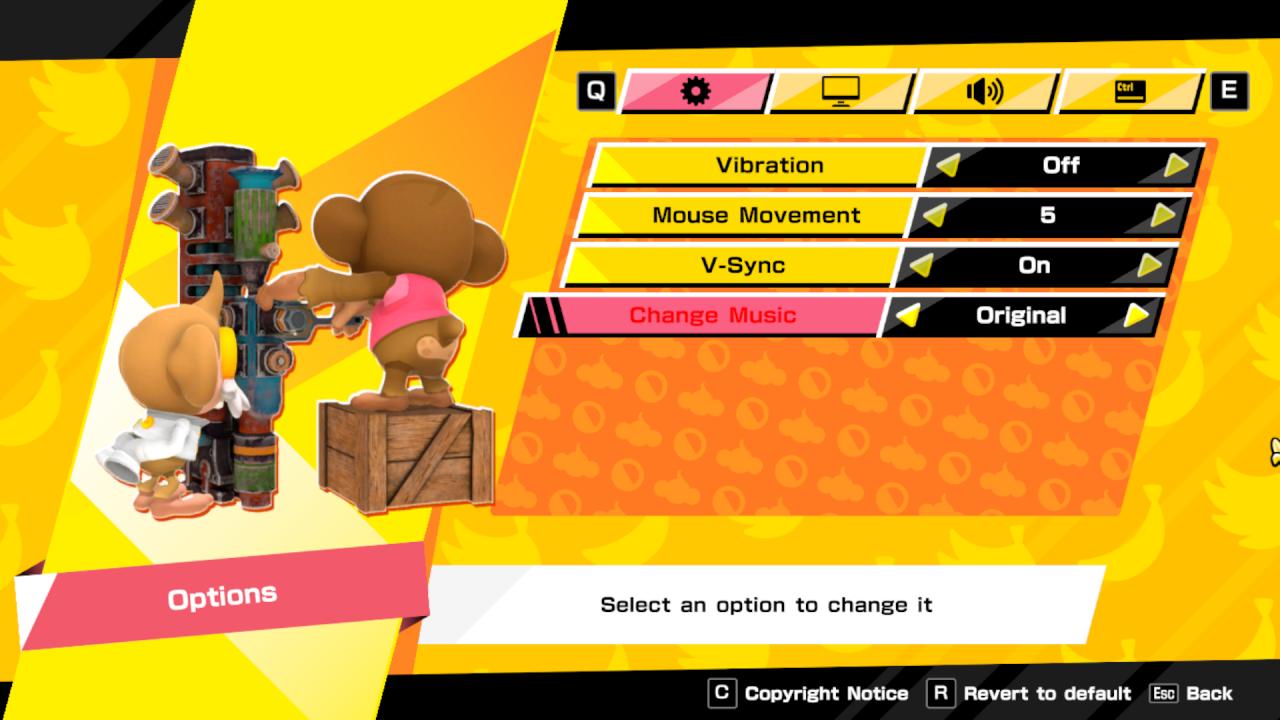
4.) Go to options
5.) Under the cog icon there should be an option labeled “Change Music”, switch that to “Original”
6.) Enjoy the game with more nostalgia
Super Monkey Ball Banana Mania How to Enable Classic Soundtrack

That’s all we are sharing today in Super Monkey Ball Banana Mania How to Enable Classic Soundtrack, if you have anything to add, please feel free to leave a comment below, you can also read the original article here,  all the credits goes to the original author Mountain Man

MORE GAME GUIDES FOR YOU

Related Posts:

  • Super Monkey Ball Banana Mania 100% Achievement Guide

Leave a Reply Cancel reply

Your email address will not be published. Required fields are marked *

Disclaimer

All content cited is derived from their respective sources. If you think we have used your content without permission, Please go to the Abuse Page to contact us and we will be taking it seriously.

Recent Posts

  • Beastro: All Recipes – The Full Guide
  • Serious Sam: Siberian Mayhem – How to Unlock the “Massacre Party” Achievement in Under Two Hours
  • Librarian: Tidy Up the Arcane Library! – Save Files for “You are Fired!” and “Anti-Magic Master” Achievements
  • School of Love Clubs: Full Gallery Saves (v1.9.1)
  • Soundpad: Meme Sounds Pack (2026 UPDATED!)
©2026 SteamAH | Powered by SuperbThemes & WordPress