

Recent Update added Dynamic Resolution change, Not alot of people want that so here’s how to disable it
Actually disabling it
Its quite easy really
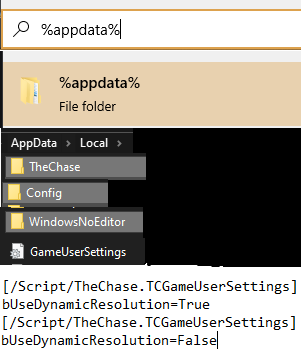
1. on the Windows search, type in %appdata%
2. go one directory below to be in the AppData folder if you are not already, then click Local
3. in the Local directory, find the folder called TheChase
4. navigate through TheChase > Saved >Config >WindowsNoEditor to find a file called GameUserSettings.ini
1. on the Windows search, type in %appdata%
2. go one directory below to be in the AppData folder if you are not already, then click Local
3. in the Local directory, find the folder called TheChase
4. navigate through TheChase > Saved >Config >WindowsNoEditor to find a file called GameUserSettings.ini
Find the line “bUseDynamicResolution=True”
replace “true” with false” then save it
Picture format incase you need it
By Lancaster