

Skip to content
Menu
SteamAH
  • Cheat
  • Guide
  • Tips
  • Privacy Policy
  • Abuse
SteamAH

Train Simulator: How to enable Time Acceleration

Posted on September 25, 2019

How to enable Time Acceleration in Train Simulator 20** (non-Career Modes only)


Time Acceleration

There is only one step necessary to enable the hotkeys for time acceleration in Train Simulator. In the Properties Pane of the game you have to add EnableAsyncKeys to the Launch Options.
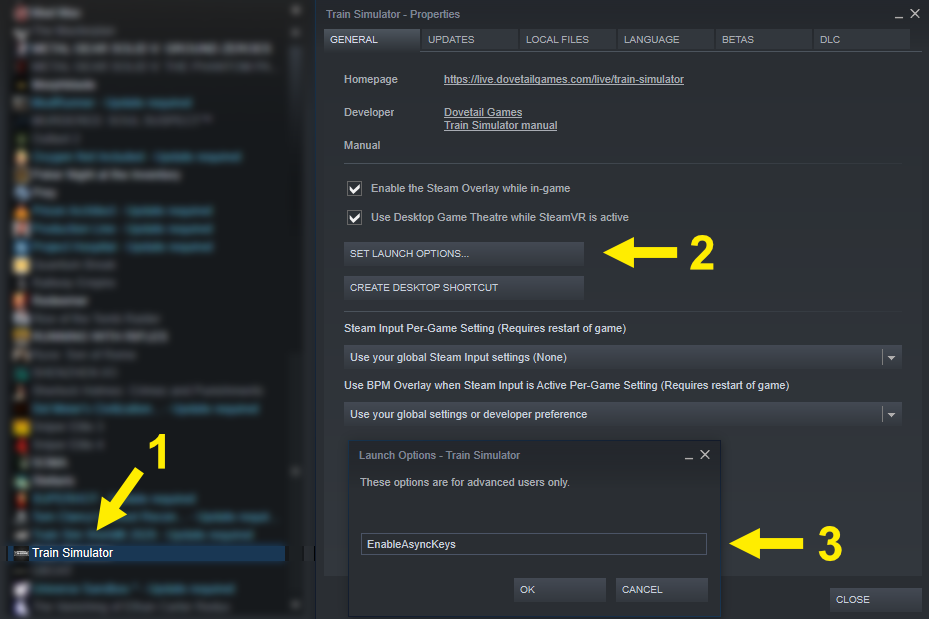
Train Simulator: How to enable Time Acceleration
⠀
Now you can accelerate time up to four values:

  • CTRL-Shift-1 — Realtime
  • CTRL-Shift-2 — Acceleration 1
  • CTRL-Shift-3 — Acceleration 2
  • CTRL-Shift-4 — Acceleration 3
  • CTRL-Shift-5 — Acceleration 4

These hokeys only work in non-career modes, e.g. Quick Drive, Standard, etc.

Written by TheNob

MORE GAME GUIDES FOR YOU

Related Posts:

  • Train Simulator How to Add Thumbnails to Your Routes
  • Train Simulator EK 1950 Naming Guide

Leave a Reply Cancel reply

Your email address will not be published. Required fields are marked *

Disclaimer

All content cited is derived from their respective sources. If you think we have used your content without permission, Please go to the Abuse Page to contact us and we will be taking it seriously.

Recent Posts

  • Windrose: 100% Save Files for All Characters
  • Commandos: Origins – 100% Save Files (DLC Included)
  • Replaced: Save Files for All Chapters
  • Spaceflight Simulator: Save Files with Many Satellites and 17 Chanllenges Completed
  • Pragmata: 100% Save Files
©2026 SteamAH | Powered by SuperbThemes & WordPress