
For World of Tanks players, if you want to choose a specific region to play, this guide will explain how to select a region.
How to Select a Region
BTW for those who want to select a region on Steam.
1. Install the game.
2. Download a DLC appropriate for your region. Enter one of those into your web browser address window and press enter.
ASIA: steam://install/1407610
EU: steam://install/1407600
NA: steam://install/1407590
RU: steam://install/1407580
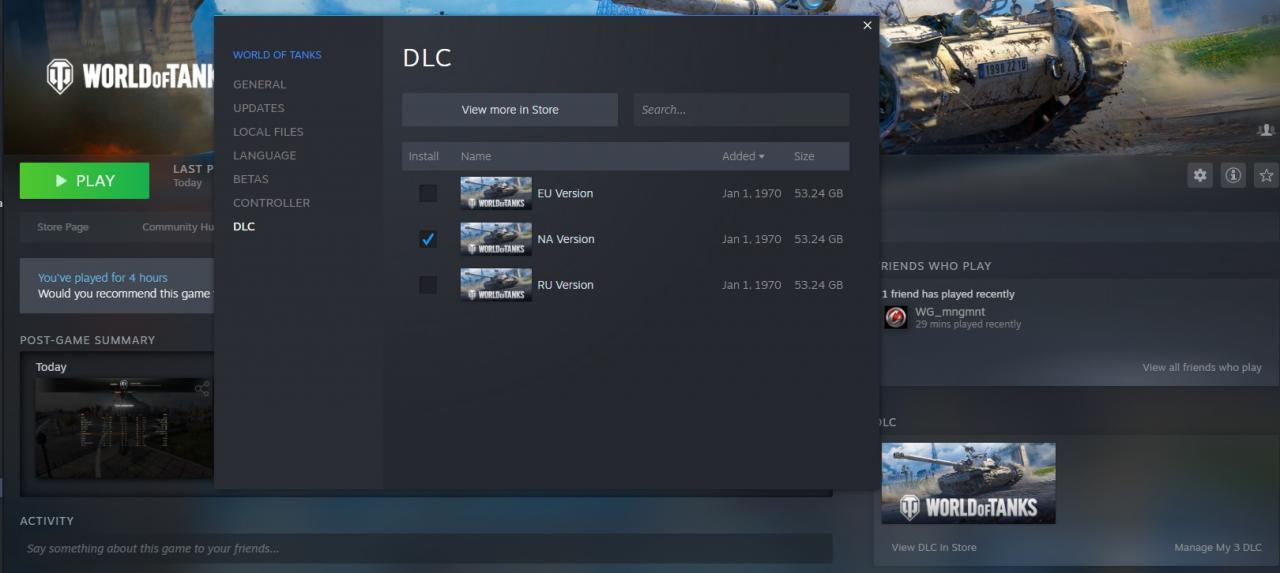
3. Select the appropriate DLC in your Manage my DLC screen.
1. Install the game.
2. Download a DLC appropriate for your region. Enter one of those into your web browser address window and press enter.
ASIA: steam://install/1407610
EU: steam://install/1407600
NA: steam://install/1407590
RU: steam://install/1407580
3. Select the appropriate DLC in your Manage my DLC screen.
That’s all we are sharing today in World of Tanks How to Select a Region, if you have anything to add, please feel free to leave a comment below, and we’ll see you soon.
Credit to Gen.Alexander
Whoever wants to die is approaching. (^_-)