
For Omega Strikers players, this guide will show you how to get rid of the Unreal Engine and Odyssey intro videos. This gets you straight into the lobby aka queueing into matches sooner!
Deleting the required files!
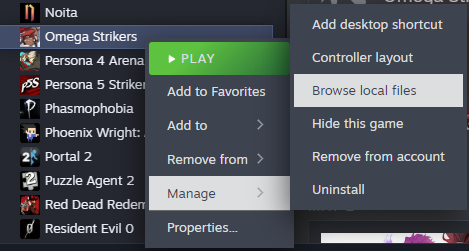
1. Right-click the game in your Steam library, hover over “Manage“, and then left-click on “Browse local files“.
2. Now a window should have opened the game’s directory. From here, double-click the “OmegaStrikers” folder, double-click the “Content” folder, then double-click the “Movies” folder. (Alternatively, you can delete the “Movies” folder, saving you some storage space. You can skip step three if you do this!)
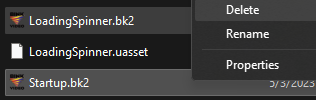
3. Delete “Startup.bk2” and “LoadingSpinner.bk2”.
Related Posts:
- Omega Strikers Skill Keyword Cheat Sheet
- Omega Strikers Tips and Tricks for New Players
- Omega Strikers Basic Tips and Strategies Guide
- Omega Strikers Character Trainings Guide