

For Apex Legends players, if you are having problems with the performance of the game. this guide will show you how to make apex feel smooth like other games and stutter free.
Fixes
press this
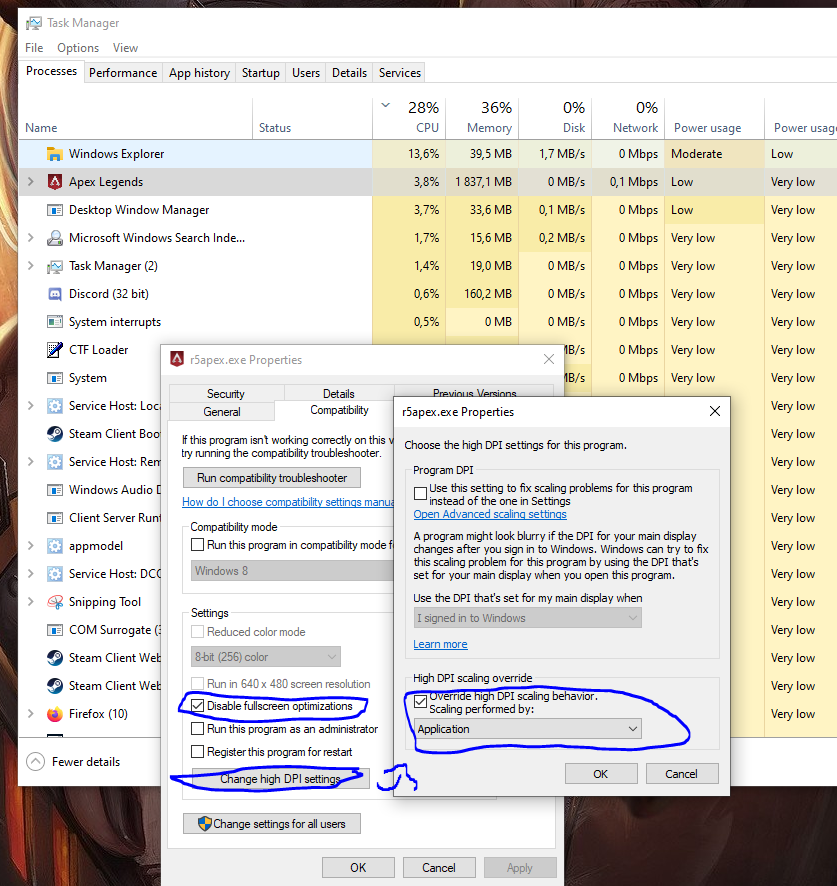 then limit your fps by putting for example
+fps_max 170
in launch options. Make sure your fps doesnt drop below it when playing.
Then restart game
then limit your fps by putting for example+fps_max 170
in launch options. Make sure your fps doesnt drop below it when playing.
Then restart game
That’s all we are sharing today in Apex Legends How to Fix Stutter and Make Apex Run Smooth, if there are anything you want to add please feel free to leave a comment below and we’ll see you soon.
Credit to rkssssss
Related Posts:
- Apex Legends How to Move The Game Version from Origin to Steam (Season 7)
- Apex Legends how to Unlink your Origin Account from Steam
- Apex Legends Box With Gold Tier Weapon Location
- Apex Legends Important In-Game Settings Guide
- Apex Legends How to Change Only the Audio Language