
This walkthroug is still WIP, and I will finish it tomorrow.
—
Prerequisites & Key Mechanics
Before diving in, understand these core systems. They govern almost every decision you’ll make.
Store Hours and the Day Cycle
- The store operates AM to PM.
- You end each day by sleeping on the couch.
- Deliveries, VIP orders, and truck arrivals are scheduled throughout the day. Check the delivery schedule on your computer regularly.
Licenses
Licenses unlock new product categories and are the primary gate on your income growth. Key licenses in progression order include:
- Repair Goods License — $1,000
- Gardening + Repair License — unlocks gardening supplies and repair items (14 items, ~$25 average revenue each)
- Outdoor Goods License — $2,000 (15 new items, ~$51 average revenue)
- Medical Supplies License — $3,000 (enables in-person, drone, and wholesale medical sales)
- Musical Goods License — $4,000
- Consumer Electronics License — $6,000
- Space Goods License — $10,000
Warehouse Levels
Warehouse upgrades gate major automation. Notable thresholds:
- Warehouse Level 2 ($1,500) — unlocks robots, multiple deliveries, additional customer service terminals, and the small cart.
- Warehouse Level 3 ($8,000) — unlocks the automatic labeling machine and cleaning robot.
- Higher expansions unlock wholesale delivery, additional loading docks, and the full robot roster.
Robots and Their Capacity Limits
You can own a maximum of:
- 2 Customer Service robots
- 3 Loader robots
- 1 Cleaner robot
- 3 Warehouse robots
- 1 Engineer robot
- 1 Drone Operator robot
- 1 Wholesale robot
- 1 Restocking robot
Note: Customer Service robots cannot operate drones — you must handle drone deliveries yourself unless you buy the dedicated Drone Operator robot.
Consumables You Must Keep Stocked
- Branded bags (client bags)
- Labeling rolls
- Trash bags
- Drone containers
- Repair kits
- Fire extinguisher
—
Walkthrough — Part 1: Getting the Store Running (Day 1)
Answer Shirley’s Call
Answer the incoming call from Shirley. She introduces the store and gives you your first objectives. This triggers the tutorial chain.
Enter the Warehouse and Turn On Power
Walk through the door into the warehouse. Locate the breaker and turn on the electricity. Nothing else works until power is on.
Collect Trash
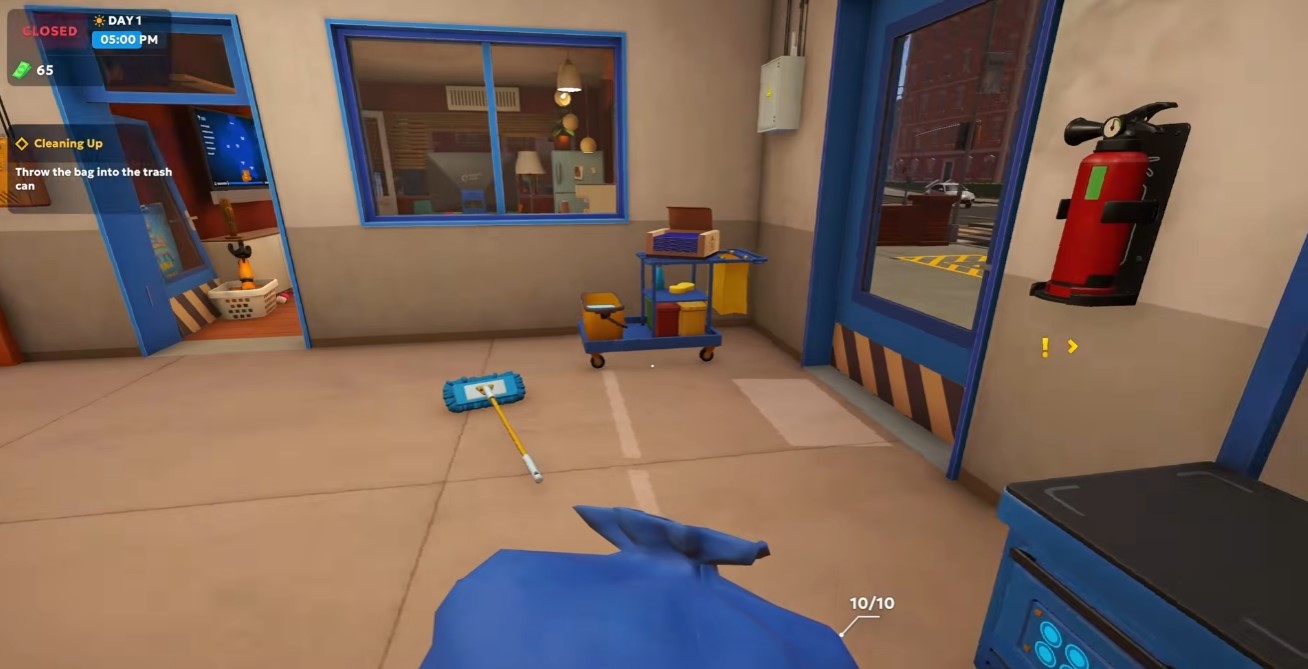
Pick up scattered trash around the warehouse floor and dispose of it into trash bags. You will need to purchase trash bags later — the starting supply is limited.
Mop the Floor
Grab the mop and clean all visible dirty spots on the warehouse floor. Dirty floors persist and will need repeated mopping throughout the game.
Set Up the Shelf
Place the shelf in the highlighted designated area. This is your first product storage point.
Answer Shirley’s Second Call
Shirley calls again with instructions about activating the license and branded bags. Listen carefully — this unlocks your ability to sell.
Activate the Loading Dock
Turn on the loading dock to allow deliveries. A van will arrive. Unload every box from the van until it is completely empty.
Label Boxes
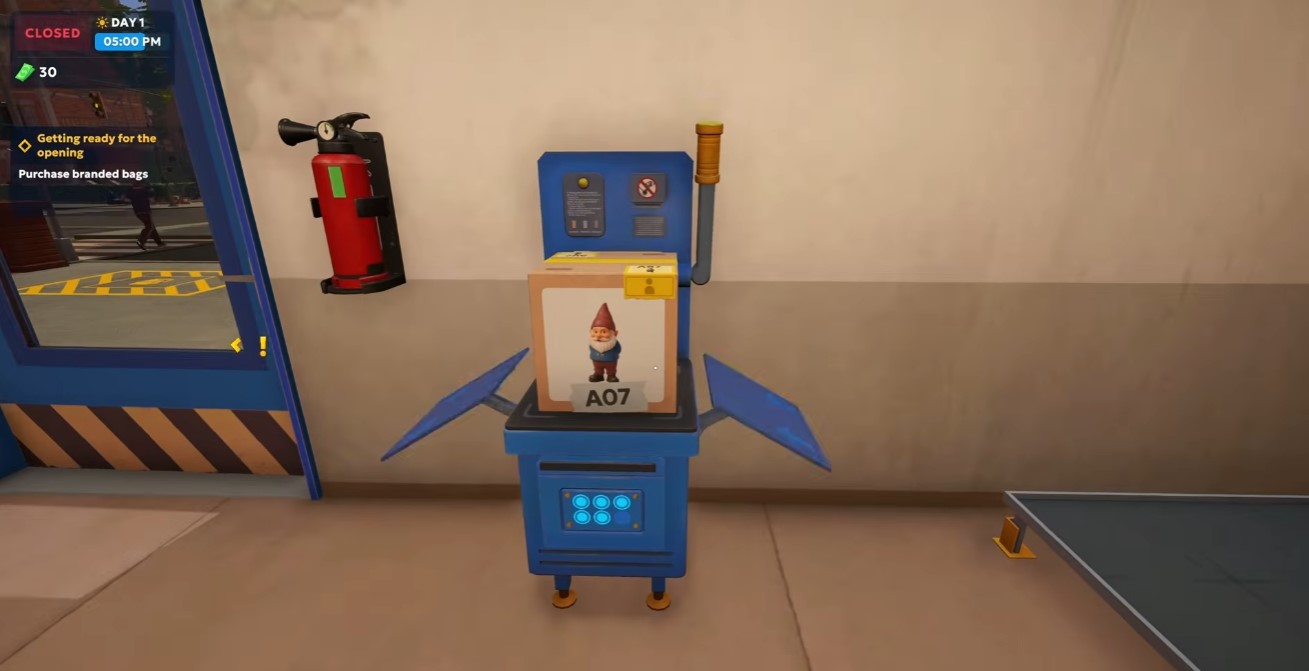
Place a box on the label machine and pull the lever to print a label. Then place the labeled box onto the shelf. Repeat for each box.
Purchase Supplies
From the shop, buy:
- Branded bags
- Labeling rolls
- Trash bags
- Drone containers
- Repair kits
- Fire extinguisher
Open the Store
Open the store to begin serving customers. Remember: AM to PM.
Serve Your First Customer
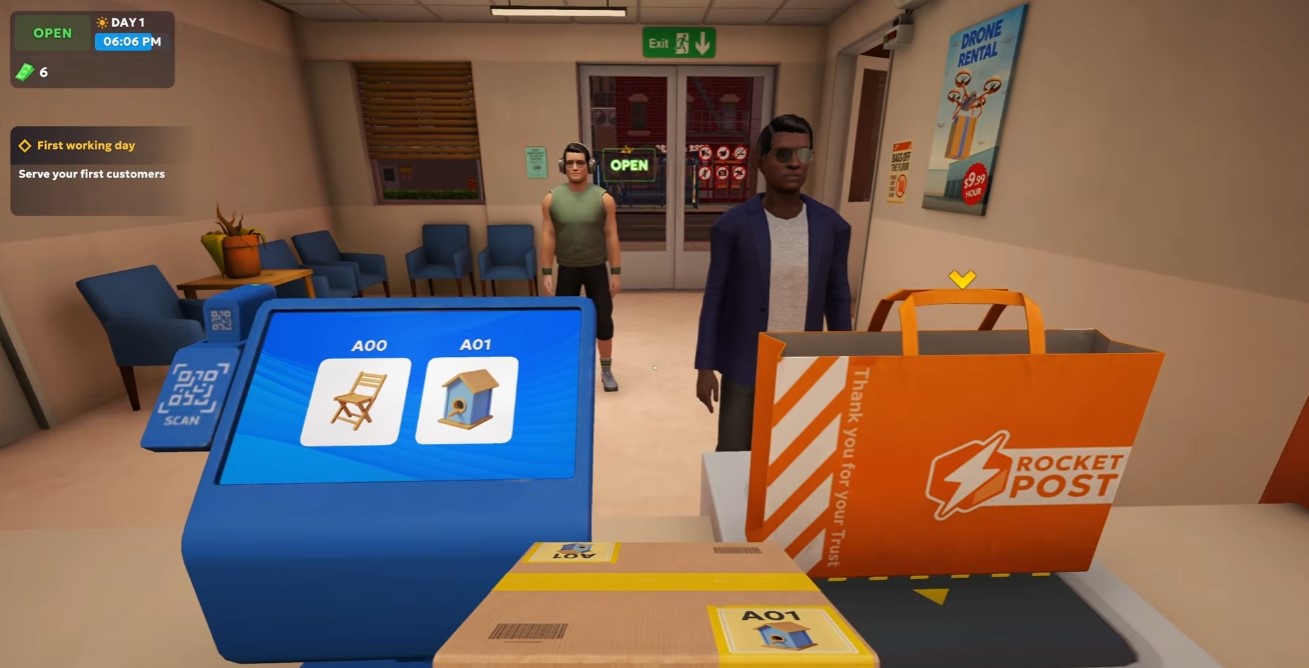
- Scan the customer’s QR code to see their order.
- Take a bag and place the correct items into the boxing container.
- Hand the bag to the customer to complete the sale.
Mop Dirty Spots
Customers track in dirt. Keep the mop handy and clean spots as they appear to maintain store quality.
Dispose of Trash
Pick up empty boxes and other trash and put them in trash bags. You can drop items on the ground temporarily if your hands are full.
Sleep to End the Day
When the workday ends, go to the couch and sleep. This skips the night and starts the next day.
—
Walkthrough — Part 2: VIP Orders and the Repair License (Day 2)
Receive Your First VIP Order
Answer the call about the first VIP order. VIP orders must be delivered personally but pay significantly more than walk-in sales. Buy a new license to attract more VIP clients.
Unload New Supplies
Unload the new supplies from the truck, label the boxes, and place them on the shelf.
Accept the VIP Order (Logan Johnson)
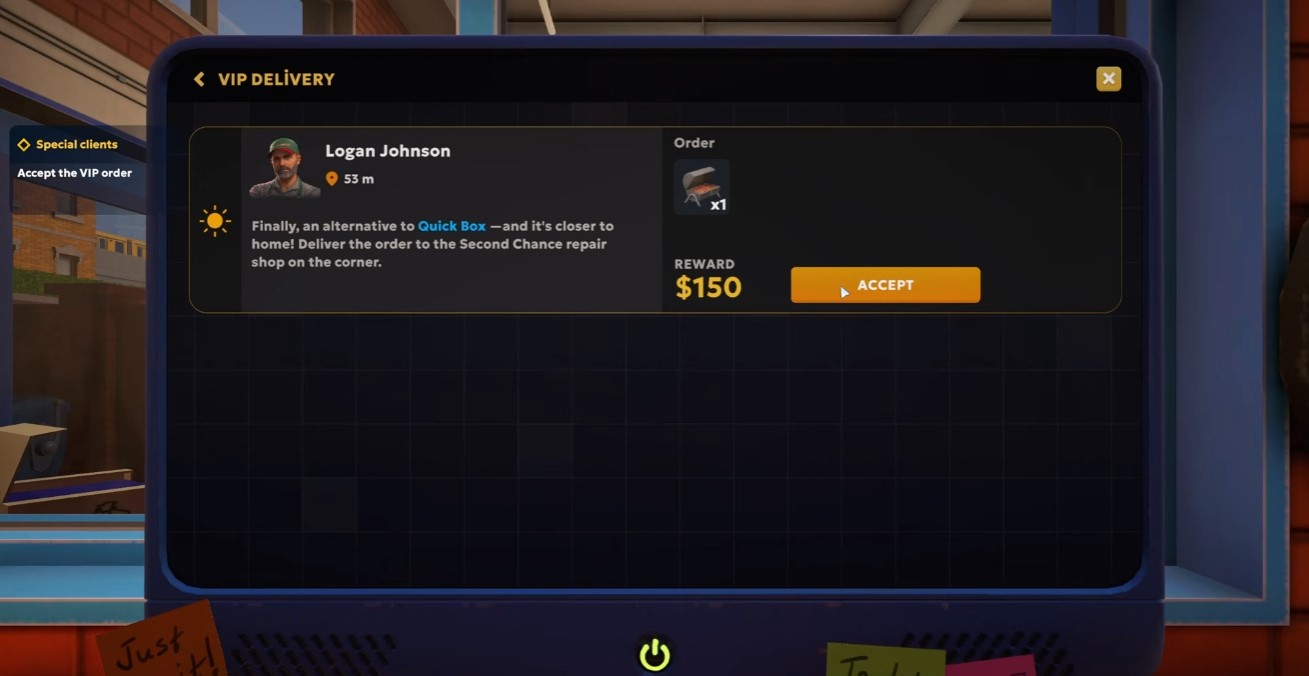
Accept Logan Johnson’s VIP order for a barbecue grill. Deliver it to the Second Chance Repair Shop on the corner.
Check the Delivery Schedule
Monitor the delivery schedule on your computer. VIP items are delivered separately via your own delivery system. Today’s schedule:
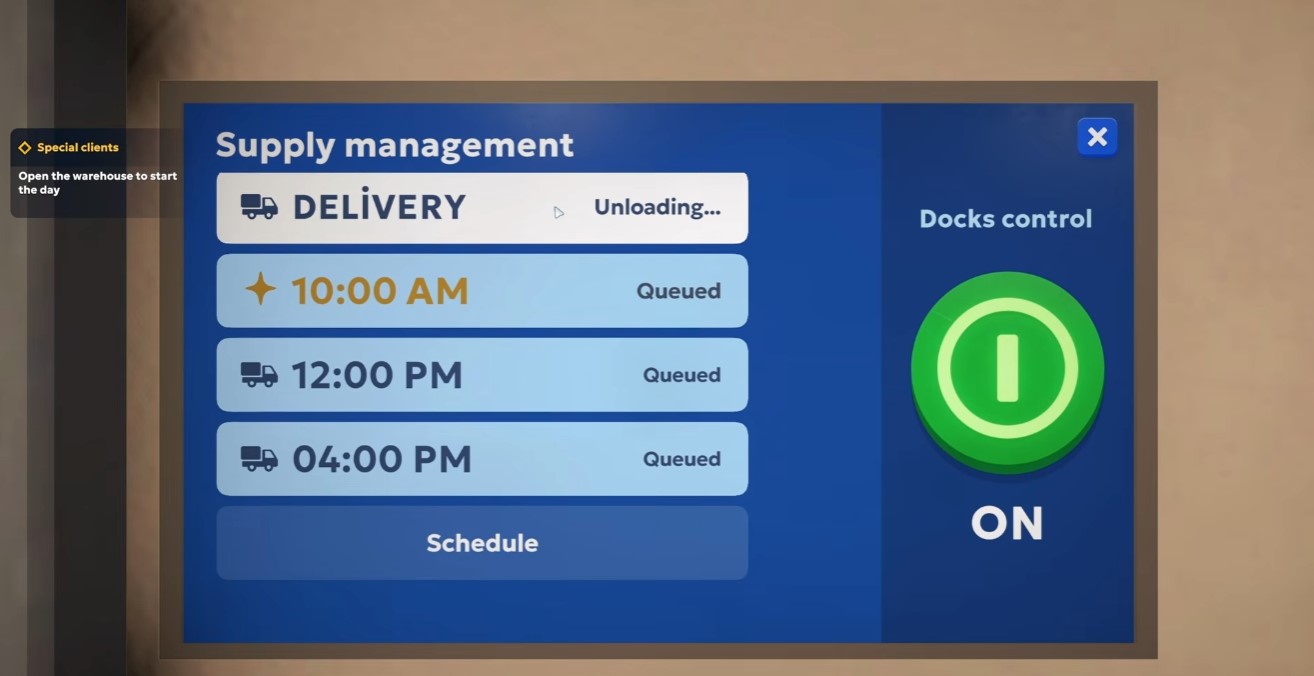
- AM — completed
- AM — VIP queued
- PM — queued
- PM — truck queued
Deliver the Grill
When the grill arrives, take it to the Second Chance Repair Shop across the street. Label the package before delivery.
Sort Items by Location Code
Place items in numerical order by their location code (e.g., A06, A09). This keeps inventory organized for shipping.
Deliver the VIP Order
Label the VIP order and deliver it. Step away from the counter and go across the street to the repair shop.
Unlock the Repair Goods License
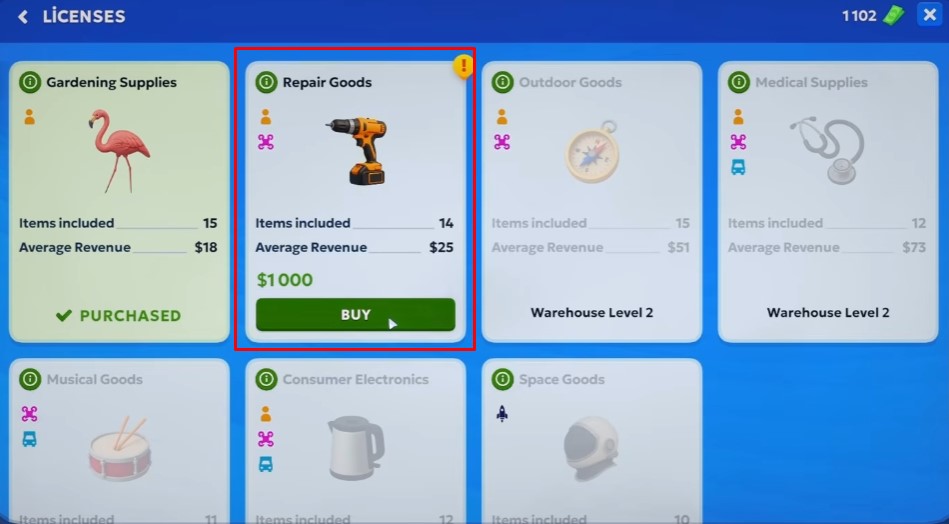
A neighbor requests tools and will place a bigger order if you obtain a repair goods license. The license costs $1,000. You likely have about half — keep working.
Clean the Store
Grab a mop and clean the front of the store. Use trash bags to dispose of trash.
Fulfill Orders
Process orders for items like pots and chairs. Package and label them for delivery.
Label Boxes
Start labeling boxes with location codes (A13, A14, A15, A16, etc.). Ensure each package is correctly labeled.
Purchase More Bags
Buy more client bags — you are running low.
Fulfill the Garden Hose Order (Eddie Marsh)
Eddie Marsh needs a garden hose to run a line through a sewer tunnel. Ensure it’s long enough and won’t kink. Find it in the gardening section.
Deliver the Garden Hose
Deliver the garden hose to the customer across the street. Drop it off at the designated location.
Continue Labeling
Label remaining boxes (A19, A20, A21, etc.) and process orders for customers (A14, A16).
End of Work Day
Workday over. Organize boxes for tomorrow. You still need $1,000 for the repair license.
Review Upgrades
Check available upgrades: expansion, loading docks, customer terminals, drone deliveries, wholesale deliveries, and space delivery.
—
Walkthrough — Part 3: Gnomes, Licenses, and Robots (Days 3–4)
Accept the Garden Gnome VIP Order (Harper Moore)
Harper Moore requests a garden gnome. It is fragile — handle it carefully.
Label Box A25
Label box A25. The gnome delivery is scheduled for AM.
Use the Coffee Machine
Use the coffee machine to increase your stamina pool for the day. Avoid clicking the “lost things” button — it can cause issues.
Collect and Dispose of Trash
Pick up trash around the store and throw it into the trash can. Consider placing a trash can in the lobby for convenience.
Pack the VIP Order
Select the required items and place them in the box. Complete the packing to finish the order.
Buy the Gardening and Repair License
Purchase the license that unlocks gardening supplies and repair items. This adds 14 items with an average revenue of $25 each.
Accept Logan Johnson’s New VIP Order
Logan Johnson orders tools. Deliver to the same location as before.
Deliver the Gnome
Pick up the gnome and deliver it to the customer across the street. Hand it over to complete the delivery.
Buy an Additional Shelf for Tools
Purchase another shelf to organize tools. Place it in the store.
Buy Labeling Supplies
Purchase labeling supplies for $35. Consider buying a shelf for $200 if needed.
Deliver the VIP Order for Nick Nuna
Check the computer for Nick Nuna’s VIP order. Deliver the goods contactless to the specified location.
Gain a Regular Customer
After delivering to the repair shop guy, he becomes a regular customer and offers urgent repair services.
Deliver the Bird Feeder
Identify the bird feeder item and deliver it. Continue labeling items as needed.
Learn About Robots
Receive a phone call introducing robots that can automate warehouse tasks. Robots are available in a dedicated app on the computer.
Buy a Repair Kit
Purchase a repair kit to fix worn-out warehouse equipment. Use it to restore performance.
Deliver the VIP Order to Nick Cana
Follow the map to deliver the VIP order to Nick Cana. Find the green birdhouse to complete the delivery.
Accept New VIP Orders
Accept VIP orders from Emma Taylor (fertilizer) and Avery Miller (chairs). These will be delivered later.
Clean Up the Store
Throw away full trash bags and organize items. Be careful not to throw away items that are still needed.
Plan the Warehouse Expansion
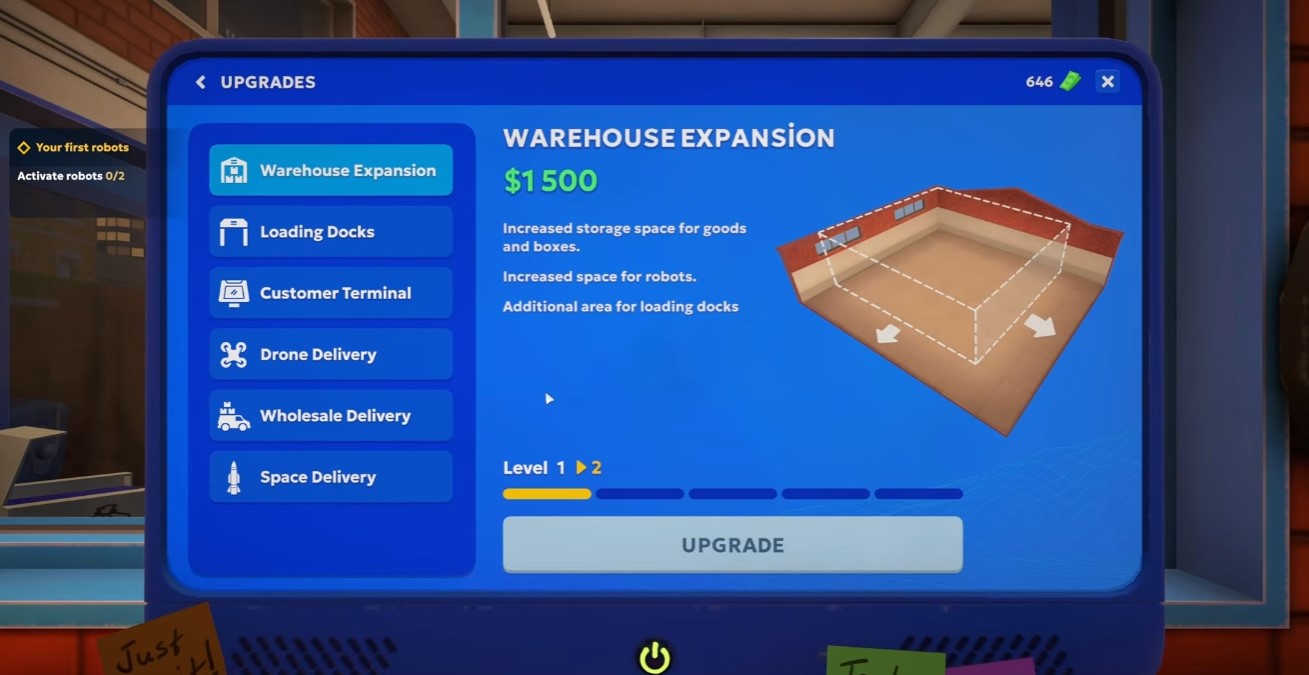
To unlock robots, reach warehouse level 2 by purchasing a warehouse expansion for $1,500. This allows multiple deliveries and additional customer service terminals.
Buy a Shelf for Consumables
Purchase a shelf for consumables to organize items off the ground. Place it in the store.
Optimize Shelf Placement
Arrange shelves to minimize walking distance. The game auto-snaps shelves to the grid for easy placement.
Accept VIP Orders
Multiple VIP orders appear, including one from Nick Nuna. Accept and process them.
Drink Coffee to Restore Stamina
Drink coffee to increase stamina.
Open the Store
Open the store to start serving customers and making money.
Attempt to Buy the Small Cart
Try to purchase a small cart — it requires warehouse level 2. Note the requirement.
Serve a Customer and Complete the Sale
Greet the customer, retrieve the requested items, and complete the sale for $30.
Check the Next License Requirements
The next license requires warehouse level 2.
Process the Delivery Order
Gather items 26, 28, and 29 for the delivery order.
Complete the Delivery Order
Deliver items 28, 29, and 30. The boxes are taken out.
Buy Multiple Bags and Boxes
Purchase multiple bags and boxes. Place one box on consumables and use the other.
Serve a Customer
Serve the customer with item 27 and complete the sale.
Complete the VIP Order for Nick Nuna
Deliver the VIP order to Nick Nuna. Payment is in the trash bin by the stairs.
Handle the Medical Supplies Delivery
Receive a medical supplies delivery. The story mentions food poisoning from burgers.
Repair the Robot
Attempt to repair the robot. It activates and gives you an ice cream. It is a collectible named Cutiepie V2.
Plan to Repair Another Robot
Decide to repair another robot during nighttime.
Process the Delivery Order
Gather items 31, 32, and 33 for delivery.
Check the Upgrade Cost
The next upgrade costs 1,500.
Process Another Delivery
Gather items 36, 33, 34, and 36. Stack boxes on the pallet.
Keep the Trash Bag Nearby
Keep the trash bag nearby for easy disposal.
Complete the Delivery
Gather items 32, 33, and 35. Complete the delivery.
Serve a Customer
Serve the customer with items 31, 32, and 35.
Complete the Delivery
Gather items 32 and 34. Complete the delivery. The entire shelf is done.
Process the Delivery Order
Gather items 37 and 38 for delivery.
Label Orders
Label the backed-up orders. Consider turning off incoming boxes if needed.
Complete the VIP Order for Ethan Carter
Ethan Carter requests the creepiest garden gnome. Gather items 37, 40, and 43.
End-of-Day Tasks
Last customer served. Proceed with end-of-day tasks.
Plan Store Expansion
Consider adding another shelf. Expansion cost: 1,500.
Restock Items
Restock items that have run out. Grab and place new stock.
Decide on Shelf Placement
Consider grabbing another shelf but decide to leave boxes on the pallet for now instead of unpacking.
Accept the Cutiepie VIP Order
Take the VIP order from Cutiepie requesting a drill for $500 to upgrade the ice cream van.
Repair the Delivery Robot
Go repair the Uber delivery robot to potentially receive a VIP order from it.
Open the Store
Open the store and prepare for robot customers.
Start Coffee and Serve Customers
Brew coffee, restock bags, and serve waiting customers including order A37.
Fulfill the VIP Gnome and Drill Order
Deliver the creepy gnome and drill for the VIP order.
Deliver the Gnome
Bring the creepy gnome to the customer who wants to scare his neighbors.
Deliver the Drill to the Ice Cream Van
Deliver the drill to upgrade the ice cream van and see if the robot starts working there.
Disable Deliveries
Turn off deliveries for the day since you’ve earned enough money.
Purchase the Store Upgrade
Buy the upgrade unlocking 3×5 shelves, small platform cart, customer service robot, loader robot, and drone delivery station.
Check the Next License Price
Look at the price of the next license to plan future purchases.
Name the Robots
Name the newly unlocked robots.
Accept New VIP Orders
Take VIP orders from Emma Taylor (birdhouse) and Eddie Marsh (hammer for sewer ladder).
Re-enable Deliveries
Turn deliveries back on to receive more orders.
Deploy the Customer Service Robot
The loader robot is less helpful, but the customer service robot will be very useful.
Manage Increased Customer Traffic
Handle the surge of customers after the upgrade. They only order items stocked behind the counter.
Deliver the Hammer to the Sewer
Bring the hammer to Eddie Marsh in the sewer to fix the broken ladder.
Deliver the Birdhouse to Emma
Give the birdhouse to Emma Taylor, then check on the man by the dumpster.
Trade a Box for Information
Give an empty box to Timothy Paul H. in exchange for useful information.
Buy a Robot and Charging Station
Purchase the $1,200 robot that prepares and hands out orders to customers. Unpack it and place it near a shelf. It comes with a charging station. Placing the shelf close to the robot lets it turn around and grab items quickly.
Check the Next License and Restock
The next license costs $2,000. Buy more labels and branded bags before advancing.
—
Walkthrough — Part 4: Automation and the Festival (Days 5–7)
Day 6 VIP Orders
Open the store and let the robot handle customers. Fulfill VIP orders:
- Tony Balchoni — bird feeder
- Lucas Bennett — yacht club decorations
- Ethan Carter — hose
Deliver the Hose to Ethan Carter
Deliver the hose. He complains about seagulls and asks for a bigger box.
Deliver the Birdhouse to Tony Balchoni
Use the stairs/fire escape to reach the rooftop and deliver the birdhouse.
Buy the Loader Robot
Purchase the loader robot and place it next to the first robot.
Receive Festival Orders
Answer the phone call about Crane Lock Day. Festival organizers are redirecting orders to Rocket Post. New VIP orders:
- Daniel Foster — tools for decorations
- Sophia Anderson — decorations for the main stage
Buy the Trolley Cart
Purchase the trolley cart to help move items.
Deliver Dental Tools to Avery Miller
Use the trolley cart to deliver the set of instruments (drill and pliers) to Avery Miller for dental care.
Complete VIP Orders
Process VIP orders by taking boxes, labeling them, and sending them to the correct recipients. Deliver festive orders to progress the event.
Deliver Festive Orders
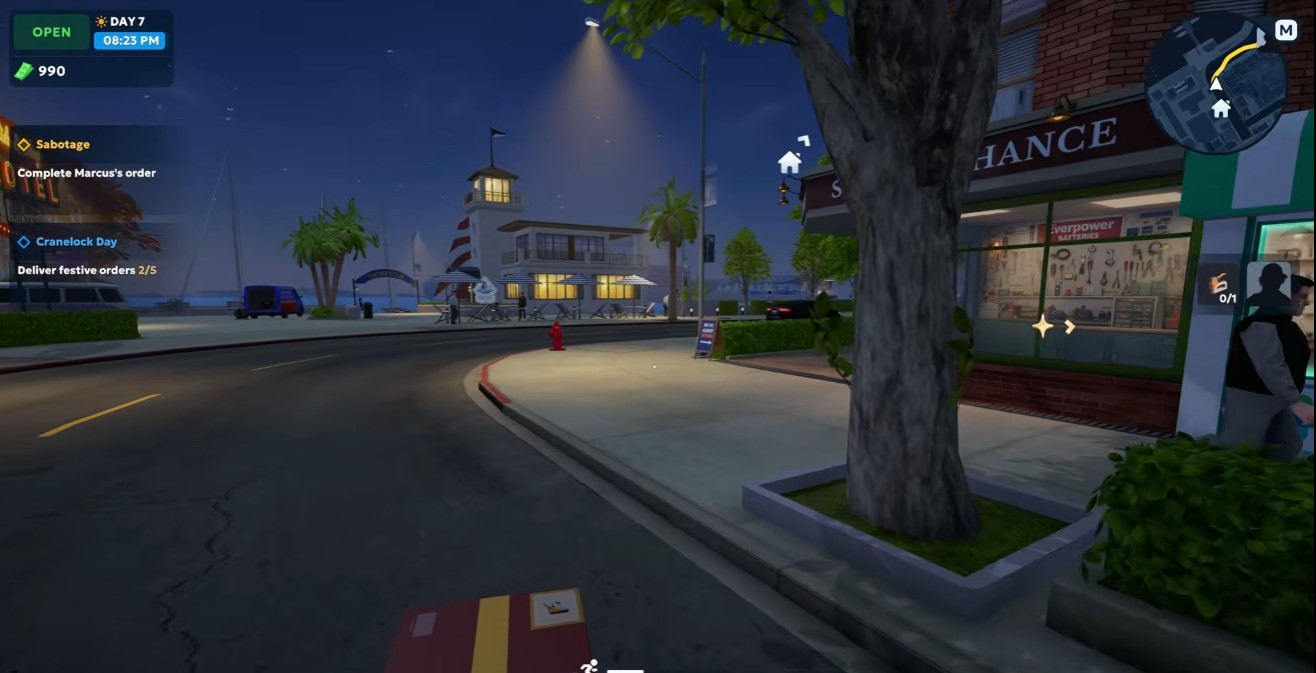
Deliver the festive orders to the stage area. Hand over flowers and build the stage before rehearsal starts.
Robot Handles Sorting
After purchasing the robot upgrade, the robot automatically organizes packages by number. No manual sorting needed.
Purchase and Place Shelves
Buy 3×5 shelves from the equipment menu. Place them in the warehouse. Note the capacity limit for shelves — you might not be able to sell them later.
Upgrade the Warehouse to Level 3
Save $8,000 to upgrade the warehouse to level 3. This unlocks the automatic labeling machine and the cleaning robot.
Buy Supplies
Purchase more bags and repair kits. Buy at least two bags and one repair kit.
Label Packages Manually
Manually label packages with sequential codes (e.g., A91, A93, etc.) and place them on shelves. Continue until labels run out.
Start the Next Day
Ensure all boxes are put out and bags are ready. The robot arm will handle further sorting.
Llama Mania Event
A new event called Llama Mania appears. Collect all the colors as part of the event.
More VIP Orders
Two more VIP orders arrive for decorative items. Complete them for $1,000 and $100.
Deliver the Grill to Nathan Coleman
Nathan Coleman needs a replacement grill urgently. Deliver the Goat version three grill.
Deliver a Box to the Customer
A customer returns for another box delivery. Provide the box to complete the request.
Clean Up the Store
Clean up trash in the store. Buy more trash bags if needed.
Sort Colored Packages
Sort packages by color (e.g., red ones first) and place them on the correct shelves.
Attend the Festival Event
The festival begins. Deliver the grill to the festival area. The robot acts as DJ and fortune teller. Enjoy the event.
Anticipate the Fireworks Event
Complete all required tasks to trigger the fireworks celebration.
Complete the VIP Order
Fulfill the VIP order and pay the $2,000 license fee.
Handle the Morning Delivery
A delivery arrives at the start of the day; process it before opening the store.
Purchase the Janitor Prototype
Buy the janitor prototype for $500 from the shop window.
Plant Flowers
Plant flowers in the flower bed out front to attract the robot.
Deliver the VIP Package
Deliver the VIP package to the customer.
Obtain the Outdoor Goods License
Purchase the outdoor goods license to unlock new VIP orders.
Accept Jacob Smith’s VIP Order
Jacob Smith requests special equipment: two flare guns and one GPS.
Save for the Warehouse Upgrade
Accumulate $8,000 for the big warehouse upgrade.
Deliver the Flare Guns and GPS
Use a cart to deliver the flare guns and GPS to Jacob Smith at night.
Speed Up the Robot
Use the speed boost on the robot, but avoid overloading to prevent fire. The speed bonus increases with each charge but fades over time; overloading may cause the robot to catch fire.
Accept Emma Taylor’s VIP Order
Emma Taylor requests a teapot and a compass.
Clean Up the Spill
Clean up the WD40 spill caused by the robot slipping.
Deliver the Teapot and Compass
Deliver the teapot and compass to Emma Taylor.
Accept Luna Vex’s VIP Order
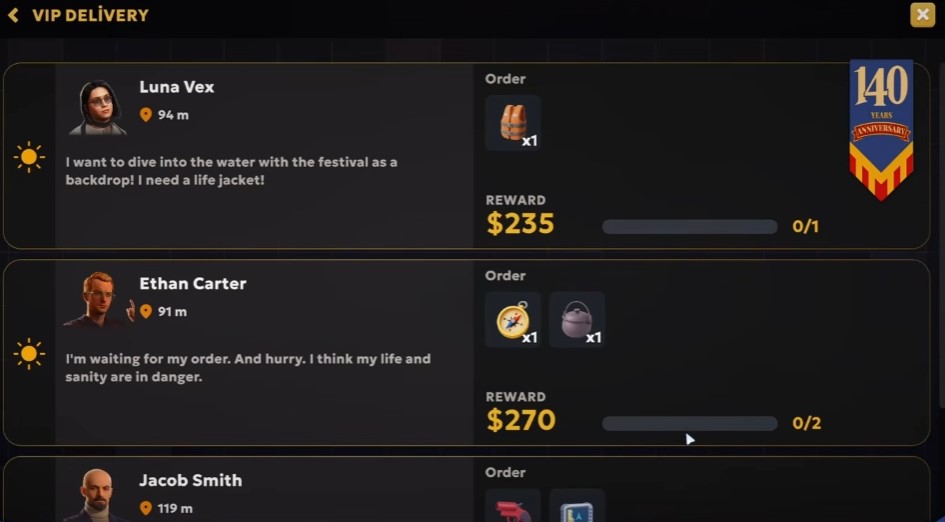
Luna Vex requests a life jacket.
Buy a Fire Extinguisher
Purchase a fire extinguisher to prevent robot fires.
—
Walkthrough — Part 5: Drones, Pink Labels, and the Black Market (Days 8–12)
Complete the VIP Order for Harper Moore
Harper Moore requests two gnomes urgently. Retrieve and deliver them.
Complete the VIP Order for Lucas Bennett
Lucas Bennett requests a set of wet suits and dive lights. Deliver them to the yacht club.
Learn About Pink Label Orders
A tutorial explains that boxes with pink labels are more valuable but require drones to complete. Note this for future orders.
Place a Robot on the Yellow Shelf
Attempt to place a robot on the yellow shelf to automate tasks. Confirm whether robots can be assigned to specific shelves.
Deliver the Gnomes to Harper Moore
Harper Moore receives the gnomes and places them. Observe the environment update.
Organize Pink Label Items
Place pink label items on the designated pink shelf. Be careful to distinguish between pink and red labels.
Complete the VIP Order for Ethan Carter
Ethan Carter requests a metal chain. Deliver it.
Restock Trash Bags
A new order for trash bags appears. Ensure trash bags are in stock.
Purchase Additional Shelves and Robots
Buy more shelves to handle increased inventory. Consider purchasing additional customer service robots to speed up order processing.
Review Robot Capacity Limits
Check the maximum number of each robot type (see Prerequisites section). Note: customer service robots cannot operate drones, so you must handle drone deliveries yourself unless you buy the dedicated Drone Operator robot.
Complete the VIP Order for Harper Moore (Gnomes)
Harper Moore requests four more gnomes. Gather and deliver them.
Send the First Drone Delivery for Jacob
Select Jacob’s order, place items in the drone, and send it off. Wait for the drone to return before accepting another order.
Send Another Drone Delivery for Jacob
After the drone returns, send another delivery for Jacob. Repeat as needed.
Deliver Four Gnomes to Harper Moore
Gather four gnomes and deliver them.
Complete the House
Deliver gnomes to the customer across the street. After delivery, the house is complete and the customer thanks you.
Check the Drone and Dispatch Worker
Check the drone for returning workers. Dispatch Yuna.
Place Trash Bags
Place trash bags near the delivery area to manage waste.
Spark a Worker and Mop
Spark a worker to revive them, then use the mop to prevent them from falling.
Retrieve the Delivery Cart
Find and retrieve the delivery cart.
Complete the VIP Delivery
Take care of the VIP delivery order.
Deliver the Saw and Metal Chain
Deliver the saw and metal chain to the customer. This completes the Emma and Ethan storyline.
Check Jacob for Orders
Check if Jacob has any orders. Dispatch Ray.
Decide on Upgrade: Consumables
Check for VIP orders. Decide to purchase consumables instead of drone upgrade or medical supplies. Consumables are prioritized over other upgrades.
Dispatch Worker and Buy Consumables
Dispatch a worker (Ethan, Nora, Harper Moore) and purchase consumables.
Complete the VIP Order for Chairs
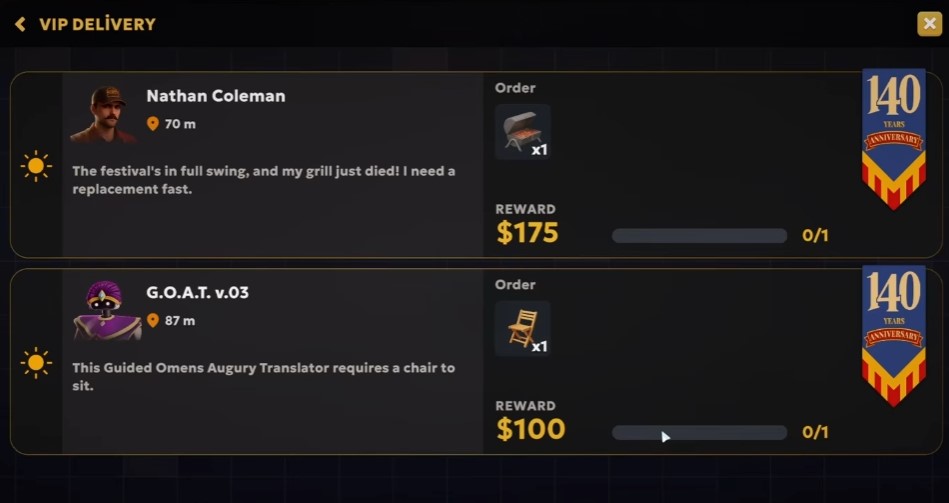
Complete Nathan Coleman’s VIP order: deliver chairs urgently.
Deliver Fishing Gear and Life Jacket
Deliver fishing gear and a life jacket for the sea crane lions’ deep sea fishing trip.
Upgrade the Customer Terminal
Attempt to upgrade the customer terminal but need level three. Cannot add a second register yet.
Dispatch Nora
Dispatch Nora for delivery.
Buy Extra Shelves
Consider buying two extra shelves due to space issues.
Complete Jacob’s Orders
Complete three more orders for Jacob.
Buy Another Pink Shelf
Purchase another pink shelf to manage inventory.
Sell Small Shelves
Sell the two smaller shelves to free up space and get money back.
Replace with Big Shelves and Buy a Drone
Replace sold shelves with three big shelves and purchase another drone.
Restock Repair Kits and Consumables
After a spill, mop it up to prevent slipping. Purchase more repair kits and consumables. The cart can hold up to eight consumables at once — useful for bulk restocking.
Save for Warehouse Expansion 8
With $4,800, consider upgrades. Warehouse expansion 8 unlocks loading docks (multiple deliveries) and new robots. Hold off on other upgrades and save for this expansion.
Clean Up Trash and Empty Boxes
Use the trash bag to clear empty boxes and trash. The cleaner bot may also handle empty boxes. Mop the front area.
Operate the Drone While Packing Boxes
Start the next day and send out the drone. The drone can operate without opening the store, allowing you to label and pack boxes simultaneously.
Disable Deliveries to Focus on Packing
Turn off deliveries for the day to concentrate on packing. Give the loader bot a day off.
Label and Pack Boxes
Label boxes (e.g., yellow labels) and pack them. Use the automatic labeling machine if available.
Repair Fallen Robots
Robots may trip and fall; repair them using repair kits. Keep an eye on robot status.
Complete Orders for Kira and Jacob
Fulfill Kira’s order by placing items in a bag. For Jacob, need one more order.
Unlock Deliveries for the VIP Order
A VIP order from Logan Johnson requires unlocking deliveries. Turn deliveries back on.
Handle the Second VIP Order
Another VIP order from Evan Foris requests a diving suit.
Complete Remaining Orders
Continue fulfilling orders, including B85 and B86. Wait for the final Jacob order, then pack and label it.
Finish Jacob’s Order
Once Jacob’s order arrives, pack items C20, C21, and C22.
Receive the Black Market Delivery Job
Jacob instructs you to deliver special goods to clients at night. A gift (orange car) is waiting at the first point.
Find the Gift Car
Go to the marked location to find the orange car left by Jacob.
Load Black Market Goods into the Car
Load black market boxes into the car. The more boxes delivered, the more money earned the next day.
Deliver Goods to Jacob’s Clients
At night, find client locations on the map and deliver their goods.
Load Boxes into the Van
Load boxes into the van. The left-hand corner shows the loading progress.
Deliver Goods to the Client
Drive to the client and deliver the goods. Your share of profits will be delivered the next morning in a black case.
Place Repair Kits in the Van
Put repair kits in the van in case you encounter a robot.
Make Regular Deliveries
Continue making deliveries to customers.
Go to Bed to Advance Time
Go to bed to advance to the next morning and collect black market profits.
Collect Black Market Profit
Check the black briefcase to collect $3,500 from the previous night’s deliveries.
Rescue the Friendly Robot
Goat tools are required to rescue a friendly robot. Gather evidence before the place gets cleaned up. Bring gloves.
Set Up Additional Customer Terminal and Loading Docks
To convince Mike to work with you, set up an additional customer terminal and loading docks quickly.
Purchase Expansion and Unlock Upgrades
Buy the expansion to get a second customer service terminal, unlock automatic labeling machines, cleaning robot, additional customer service robot, and warehouse robot.
Review Robot Purchase Costs
- Customer service robot — $1,200
- Cleaning robot — $3,700
- Warehouse robot — $2,500
Open Store and Deliveries
Open the store and enable deliveries.
Purchase the Second Loading Dock
Buy the second loading dock for $4,000.
Fix the Drone and Consider Adding More
Fix the drone. You can also add more drones if desired.
—
Walkthrough — Part 6: Space Goods and the Final Push (Days 13+)
Process the VIP Order for Thomas Freeman
Thomas Freeman requests a boiler and a pair of safety glasses.
Check the Automatic Labeler Cost
The automatic labeler costs $1,500. You can purchase up to three. Prioritize hiring robots before purchasing automatic labelers.
Load VIP Orders into the Truck
Collect a bunch of VIP orders and load them into the truck or van.
Send a Drone Delivery
Go to the drone and send a delivery for $130.
Plan to Purchase a Customer Service Bot
Save up $1,200 to buy a customer service bot.
Process the VIP Order for Avery Miller
Avery Miller needs a strong rope for unconventional medical treatment.
Check the Warehouse Robot Cost
Warehouse robots cost $2,500. Assign Austin as warehouse manager.
Sort the Misplaced Pink Box
A pink box is in the wrong spot. Move it to the correct location.
Collect Empty Boxes
Grab all empty boxes and organize them.
Purchase a Warehouse Worker
Buy a warehouse worker for $2,500 to automate warehouse tasks and reduce mistakes. Warehouse workers handle pink and yellow boxes correctly.
Order Medical Supplies
Order medical supplies to fulfill future VIP requests.
Purchase Another Pink Shelf
Buy another pink shelf. This is the last pink shelf available for purchase.
Consider Hiring Unloaders
You can likely hire up to two unloaders, as there will be another delivery spot.
End Work Day and Prepare for Black Market
The workday is over. Deliver VIP orders and then proceed to black market activities.
Deliver VIP Orders
Deliver the VIP orders before starting black market tasks.
Fix the Pink Box on the Wrong Shelf
A pink box is on the wrong shelf. Move it.
Buy Another Pink Shelf
Purchase another pink shelf if funds allow.
Purchase a Repair Kit
Buy a repair kit as a consumable for maintenance.
Prepare a Drone Delivery
Set up a drone delivery for $180. Select items C28, C28, C28, C28, C30, and another item.
Deliver the VIP Order to Avery Miller
Go down the street to Miss Avery and deliver the rope. She mentions needing a medical supplies license.
Investigate the Black Market Scene
Police are at the black market scene. Examine evidence: sticky residue, ammonia smell, and gloves left behind.
Receive the VIP Order for a Deer Head
A new VIP customer, Bobby O’Conor, requests a deer’s head. Pay $4,000 to unlock the next loading dock.
Acquire a Warehouse Robot
Purchase a warehouse robot. Assign it to a unit (e.g., Unit 145).
Restock Drone Containers
Drone containers are out of stock. Restock them from storage.
Handle the VIP Order for the Deer Head
Retrieve the deer’s head and deliver it. Warehouse workers do not handle VIP orders — you must do it manually.
Automate Store Operations
With warehouse robots and restockers, the store and warehouse can operate automatically. Only drone deliveries require manual action.
Perform a Drone Delivery
Use the drone delivery service. Drive to the delivery location and complete the drop-off.
Restore the Statue with the Deer Head
The fortune-telling robot decapitated a statue. Use the deer’s head to restore the statue and avoid a scandal.
Utilize Restockers
Restockers can refill counters with bags. Ensure they have access to supplies.
Manage Garbage for Boxes
Keep up with garbage collection so warehouse workers have space to place boxes. Empty bins regularly.
Use a Repair Kit on Broken Robots
A repair kit is available in the van. Use it to fix broken robots encountered while exploring.
Find and Activate Billboards
Locate billboards around the map and pay $10 to place an ad. There are 10 billboards total; you currently have 2 and need 8 more.
Check Billboard Progress
Access the map in the office to view billboard locations and progress.
Complete the Harbor Delivery
Deliver to harbor locations C43 and C46 using the drone delivery service.
Plan the Next Upgrade: Medical Supplies
The next upgrade is medical supplies for $3,000. A cleaning robot could also help remove empty boxes from shelves.
Label Packages C43 and C46
Apply labels to packages C43 and C46.
Obtain the Medical Supplies License
Acquire the medical supplies license, which unlocks a blue truck for wholesale orders.
Receive the VIP Order for Nasal Aspirators
Jacob Smith requests a shipment of nasal aspirators ($2,200 each) for influential customers.
Stock Up on Consumables
Order a large batch of consumables to maintain warehouse operations.
Organize Warehouse Items
Place repairs, bags, trash bags, and drones in designated areas. Use the drone pad for future orders.
Prepare Future Orders for the Drone
Set up the drone to handle future deliveries automatically.
Prioritize the Loading Dock Over the Cleaner Robot
Save money for the loading dock upgrade instead of purchasing the cleaner robot. The cleaner robot is not top priority.
Receive the VIP Order for Garden Shears and Shampoo
Avery requests garden shears and a can of shampoo urgently.
Load and Deliver VIP Orders
Load five nasal aspirators into the van and deliver them. Use the trolley if needed.
Send the Drone on Delivery
Before leaving, ensure enough bags are stocked and send the drone out.
Deliver Shampoo and Shears to Avery
Deliver the shampoo and garden shears. The patient’s hand is stuck in a vending machine; shampoo is used to free it, with shears as backup.
Wait for Nighttime to Deliver
Some deliveries can only be made at night. Wait until nightfall.
Check Trolley Upgrade Requirements
The trolley requires level 4. Consider saving for the automatic labeling machine. Saving up for the loading dock ($4,000) is a priority.
Complete the Drone Delivery for C-54
Find package C-54, label it, and send it via drone. Earn $250.
Repair Rusty
After an incident, repair Rusty to restore functionality.
Send the Drone with Packages
Send a drone out with packages. Prepare multiple packages in advance to load quickly when the drone returns.
Repair the Drone
Use a repair kit to fix the drone when it breaks down.
Send an Expensive Package
Send a drone with a more expensive package; look for C-55 and C-58 items.
Get the Automatic Labeler
After dock 2, acquire the automatic label upgrade.
Check the Crime Scene
Drive to the crime scene to see if it’s still active; you cannot take items from it.
Deliver the Aspirators
Drop off the aspirators as part of the medical supplies delivery.
Drive to the Location
Drive down to the delivery location.
Purchase the Second Dock
Use money to buy the second docking bay.
Enter the Second Warehouse
Go to the second warehouse and enter it.
Load 30 Boxes
Load 30 boxes from the second warehouse.
Track Box Count
Keep track: 8 out of 30, then 6 more left, then 3, 2, 1.
Leave the Warehouse
After loading all boxes, leave without locking or shutting the door.
Use the Loading Shortcut
Use the loading station to load 10 times instead of 30, saving effort.
Collect Payment
Go collect the payment; receive the $8,000 briefcase.
Answer Mike’s Call
Answer Mike’s call about the new dock and partnership; accept the first order in the database.
Receive New Quests
- Deliver order to construction site for Mike Stone
- Get glasses for Marcus
- Get aspirin for Archer Reed
Buy Loader and Cleaning Bots
Purchase another loader bot and a cleaning bot. The cleaning bot can take care of empty boxes, reducing manual garbage disposal.
Deploy the Cleaner Bot
Place the cleaner bot in the store to automatically clean up empty boxes and debris.
Purchase the Automatic Labeler
Buy the automatic labeling machine. It holds nine items instead of six.
Restock Consumables and Equipment
Buy more consumables, a fire extinguisher for the side of the building, additional labeling supplies, and a repair kit.
Purchase New Licenses
Buy the musical goods license for $4,000 and consumer electronics license for $6,000. Consider the drone delivery upgrade.
Prepare Drone Deliveries
Load packages for drone deliveries: C-58, C-48, C-55, 58, 69, 76, 83. Restock shelves before leaving.
Deliver to the Billboard
Drive to the billboard location and deliver the package. The reward is the billboard itself.
Prepare Orders for Tomorrow
Check warehouse shelves and prepare orders for the next day. Ensure labels are stocked and loaders are assigned.
Accept New Quests
- Deliver a flashlight to Bobby O’Connor at the hotel
- Deliver materials to Mike Stone at the construction site
- Bring more gnomes to Harbor Moore
Deliver to the Space Store Construction
Deliver measuring tape and screwdriver to Mike Stone at the Above Space construction site. Completing this opens a partnership.
Deliver Aspirin to the Circus
Deliver aspirin to the circus area. The package contains makeup, wigs, and fake noses.
Complete Sales and Unlock Musical Goods
Sell musical goods for $1,200 and $6,900. This unlocks musical goods in the store with an average revenue of $103 per item.
New VIP Order: Sound Equipment
Jacob Smith requests a pink microphone and a Bluetooth speaker for $3,400.
Capture the Area
Complete the delivery to capture the area. Deliver first, then capture the objective.
Purchase a Second Drone
Upgrade to a second drone for $3,500.
Repair the Broken Robot
Use a repair kit to fix a broken robot in the warehouse.
Load the Trolley Efficiently
Load multiple boxes onto the trolley at once instead of one by one.
Deliver Gnomes to Harbor Moore
Find and deliver additional gnomes to Harbor Moore’s yard across the street.
Deliver the Flashlight to the Police Officer
Find a flashlight and deliver it to the police officer at the hotel to restore power and access rooms.
Deliver Paint and Brushes
Deliver paint and brushes to the construction site. Next step requires lighting and consumer electronic license.
Send Drone Deliveries
Prepare and send out two drone deliveries for orders C84 and C85.
Restock Bags and Order Supplies
Restock bags and reorder eight bags. Check that labels, repair kits, and containers are sufficiently stocked.
Complete the Nighttime Delivery
Proceed with the nighttime delivery.
Loot the Abandoned Warehouse
Enter the abandoned warehouse and collect 30 items. Avoid explosive boxes. Use a cart if available.
Return Home and Prepare the Next Day
After looting, return home. Load up regulators and prepare for the next day. Collect payment from the black briefcase ($12,000).
Purchase Warehouse Expansion and Upgrades
With $19,000, buy the warehouse expansion to unlock wholesale delivery. Purchase the large automatic labeling machine ($4,000) and large platform cart. Consider buying the engineer robot for repairs.
Set Up the Automatic Labeling Machine
Connect the large automatic labeling machine to a pallet. It will automatically take boxes from the pallet and label them.
Prepare and Send Drones
Load drones with packages for delivery. Check for specific package numbers like 86 and 88. Ensure all drones are topped off before leaving.
Use the Large Cart for Deliveries
Utilize the large cart to transport multiple packages efficiently.
Sell Unnecessary Items
Sell any items that are no longer needed to free up space and earn extra money.
Install Billboards for Above Space
Above Space hired you to install billboards. Their loading robot got an update. Turn on the billboard device to proceed.
Check for New Orders
New orders become available. Check the order list and accept new deliveries.
Deliver to the Rooftop
Navigate to the rooftop to deliver a package. Use the environment to find a way up.
Investigate the Stakeout Location
The stakeout is off. The informant was mistaken. Found surveillance files on Rocket Post. QuickBox is interested in you.
Fulfill VIP Orders
- DJ Glitch requests a DJ set upgrade with notched platters
- Evan Foris needs a pool and a battery
Consider Purchasing a Warehouse Robot
Consider buying another warehouse robot. Save money for the electronics consumer license instead.
Handle VIP Packages
Ensure VIP packages are delivered. Check that all bags are loaded.
Save Money for Wholesale
Save money to unlock the wholesale system. Wholesale allows bulk deliveries for higher profits.
Deliver the Pool and Battery to Evan Foris
Deliver the pool and battery to Evan Foris. Ensure no mistakes.
Deliver to DJ Glitch
Deliver the requested items to DJ Glitch. He needs circular saw blades for his DJ experiments. Obtain a music goods license to expand his experiments.
Repair Broken Robots
Find and repair broken robots. One robot is on fire. Use a fire extinguisher if available. Consider hiring an engineer for repairs.
Start Wholesale Delivery
Accept a wholesale delivery order for $3,500. Load required boxes into the wholesale van. Select the delivery route and dispatch. Wholesale boxes are marked with blue stickers and have no number.
Purchase a Shelf for Wholesale
Buy a shelf for wholesale goods. Place it in the designated area.
Accept New Drone Orders
Accept new drone delivery orders. Drone orders are becoming more profitable as you transition to more expensive goods.
Prepare Bags for the Next Day
Set up bags for the next day’s deliveries. Ensure labels are correct and refill empty containers.
Fulfill New VIP Orders
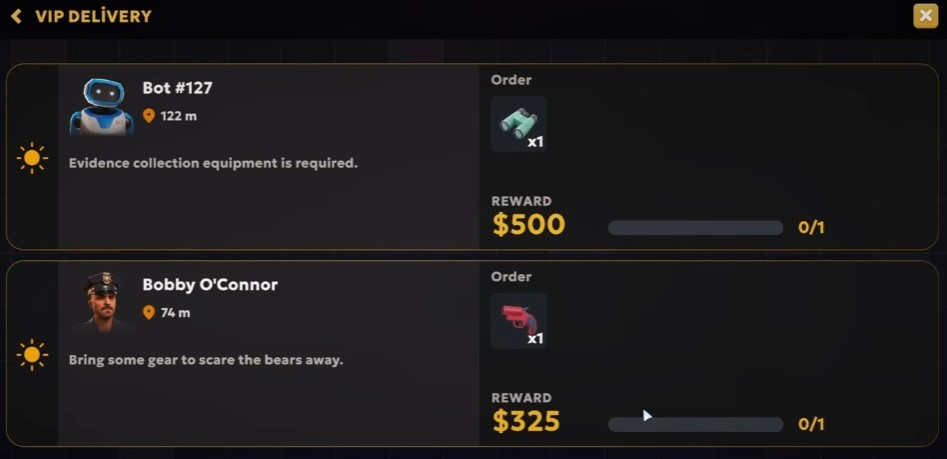
- Thomas Freeman needs two thermometers delivered to the laundromat
- Bobby O’Conor requests a delivery
Consider Hiring a Warehouse Worker
Consider hiring another warehouse worker to help with blue boxes and wholesale orders.
Wait for Wholesale Orders
Wholesale orders appear periodically. Wait for them before loading the van.
Send Drones and Open Shop
Send drones out for morning deliveries. Open the shop.
Enter Container Codes
Enter container codes 026, 77, 77, and 210.
Check Robot Upgrade Requirements
Inspect the robot for drone upgrade; requires level 4. Skip the warehouse robot and wait until obtaining the consumer electronics license.
Grab VIP Orders
Collect VIP orders and handle them manually.
Check Remaining Containers
Verify remaining containers; enter code 06 for $60.
Repair the Cleaner Bot
The cleaner bot is broken; repair it to continue.
Deliver Thermometers
Deliver two thermometers to the laundry location.
Recover the Bellhop Robot
Find and repair the bellhop robot at the motel; it is the last robot needed.
Investigate the Pool Incident
Arrive at the pool where water is outside; investigate the scene.
Assist the Janitor Robot
The janitor robot is out of consumables; provide trash bags and label roll.
Return to the Store
Return to the store and restock labels.
Buy Trash Bags
Purchase trash bags to refill the robot’s supply.
Assign Route 3
Assign a delivery to route 3.
Refill the Robot with Trash Bags
Buy a trash bag and refill the robot; it stores items in its backpack.
Purchase the Consumer Electronics License
Buy the consumer electronics license with available funds.
Restock Labels
Go to the store to buy more labels.
Accept the Cleaning Equipment Order
Accept Jacob Smith’s order for cleaning equipment; payment $5,500.
Accept the Lighting Order
Accept a larger lighting order with matching payment.
Buy Repair Kits
Purchase one more repair kit.
Buy Multiple Shelves
Buy multiple shelves for wholesale items; each costs $600.
Accept the Electronics Order
Accept Marcus’s order for a radio and headphones; deliver quickly.
Accept the Kettle Order
Accept Eddie Marsh’s order for a kettle.
Prepare a Drone Delivery
Send orders via drone in the morning; choose a route for each delivery.
Process the Violin Order
Process an order for violins and send it off in the morning.
Assign Route 3 Delivery
Assign another delivery to route 3.
Stock Trash Bags
Buy two more trash bags and place them in the store.
Repair Drones
Go to the drone area and repair both drones.
Place Wholesale Orders
Place wholesale orders for items costing $50 and $160, and restock drone containers.
Open the Store for VIP Orders
Open the store to receive VIP orders and prepare the trolley.
Complete Drone Deliveries
Continue doing drone deliveries, including simple $40 orders.
Unload the VIP Delivery
Unload the delivery van, prioritizing in-house items first, then VIP items.
Restock Store Shelves
Before leaving, ensure the store shelves are stocked.
Deliver Lamps
Load lamps into the van and deliver them.
Handle the Unlabeled VIP Box
Deal with an unlabeled VIP box that appears during delivery.
Deliver Remaining Items
Pull out 15 items and deliver them to complete the list.
Prepare for the Grand Opening
Finish all remaining tasks before the grand opening, including final touches like red carpet and guest arrangements.
Explore the Parking Garage
Drive to the top of the parking garage to search for secrets or items.
Deliver the Kettle
Deliver the kettle to the specified location.
Investigate the Sewer System
Learn about the ancient sewer system in Crane Lock and search for an outlet.
Obtain Walkie-Talkies
Acquire walkie-talkies to communicate and investigate potential illegal activities.
Mark Billboards
Mark all billboards in the area on the map as instructed.
Complete a Drone Delivery
Deliver the order via drone to the specified location.
Restock Labels and Bags
Restock labels and branded bags that have run out.
Deliver Vacuums
Deliver vacuum cleaners to the client for a reward of $5,000.
Receive the Special Reward
Complete the partnership to receive a special reward and information.
—
Walkthrough — Part 7: The Second Ending
The Second Ending unlocks after completing the main story. It focuses on space deliveries, the QuickBox rivalry, and the final truth about your character.
Travel to the Final Warehouse
Head to the last warehouse using the provided coordinates.
Deliver Alien Parcels
Inside the warehouse, collect and deliver 15 alien-themed boxes. No trolley is available — carry them manually.
Collect Alien Artifacts
Pick up the alien artifacts scattered around the warehouse. Use alien telekinesis to float up and reach higher objects.
Locate Remaining Boxes
Find the last three boxes: one on the left, one on the right, and the final one nearby.
Complete VIP Orders
After delivering the alien parcels, fulfill the pending VIP orders.
Use the Trolley for Delivery
At the next location, use the available trolley to transport boxes efficiently.
Repair Broken Items
Fix the broken items by interacting with them.
Start a New Day and Check Orders
Sleep to start the next day. New orders:
- Grand opening ribbon cutting (need scissors)
- First aid kit
- Walkie-talkies for Sophia Anderson
- Butler V5 for hotel cleaning
Restock and Collect Earnings
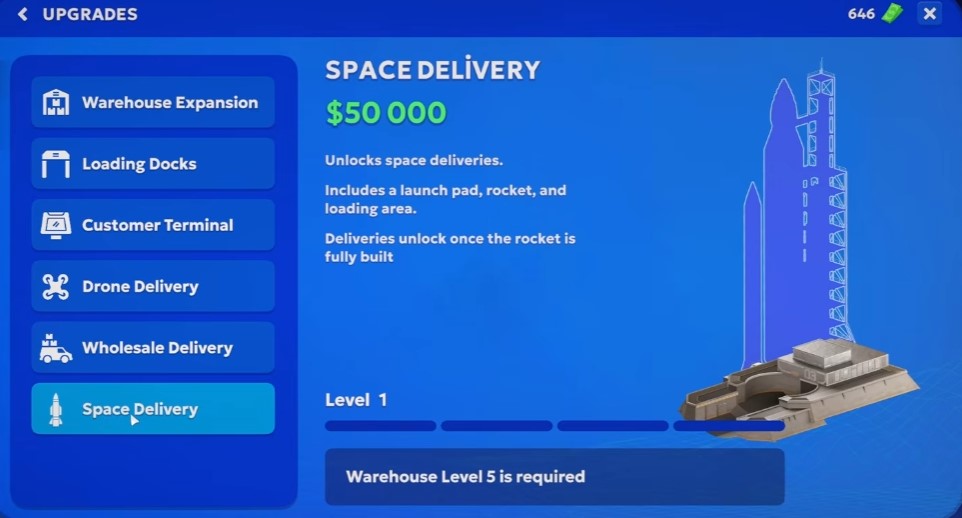
Go to bed, collect $18,000, and restock the store. Unlock the space delivery option for $50,000.
Purchase the Wholesale Robot
Buy the wholesale robot to automatically replenish stocks of bags, order containers, and labeling rolls.
Process Shipments
Send out shipments D32, D46, and others. Use label machines and sell unnecessary items.
Buy and Place Wholesale Racks
Purchase two wholesale racks and place them in the warehouse. Assign the wholesale robot to stock them.
Hire Another Warehouse Robot
Buy an additional warehouse robot to handle the increased workload.
Fulfill Specific Orders
Look for and collect items such as an Xbox controller and violins.
Identify and Package the Medical Device
Recognize the blood pressure machine/sleeve among items. Package it with a label and bag.
Assign Routes to Drones
Send out drones on route one. Ensure all packages have bags and labels.
Deliver Bandages
Pick up bandages and deliver them.
Deliver Multiple D56 Packages
Locate and deliver several D56 packages.
Process VIP Orders
Ensure VIP orders are labeled and bagged. Deliver them as part of the route.
Deliver SPF 50 and Medkit
Deliver SPF 50 sunscreen and a medkit.
Interact with the Bellhop Robot
Talk to the bellhop robot to progress the delivery or story.
Visit the Warehouse for the Alien
Go to the warehouse to handle the alien-related task.
Attend the Grand Opening
Proceed to the grand opening event. Use pliers, not scissors, for the ribbon cutting.
Complete the Above Space Store
Finish building the above space store to unlock new opportunities.
Unlock Wholesale Deliveries
Purchase the wholesale delivery upgrade to enable bulk shipping.
Complete VIP Orders
Process remaining VIP orders: tape measure, mobility tool, generator, and tools.
Purchase the Space Goods License
Buy the space goods license for $10,000.
Upgrade Wholesale Delivery
Purchase the wholesale upgrade to get two trucks for deliveries.
Unlock the Wholesale Robot
Max out wholesale delivery to unlock the wholesale robot, which automates packing.
Restock Supplies
Refill boxes, bags, and trash bags. Purchase six of the needed items.
Schedule VIP Orders for Tomorrow
VIP orders are available but decide to complete them the next day.
Start Wholesale Deliveries
Open the store and begin processing wholesale orders. A $4,000 order is available.
Build Delivery Routes
Assign items to routes: route one for the first batch, route two for the second, route three for the third. Ensure drones are dispatched.
Identify and Deliver Items
Locate items like nasal aspirator, batteries, generator, coffee, circular saw, drill, pliers, thermometer, stethoscope, medical masks, ukulele.
Deliver VIP Orders
Take the truck and deliver VIP orders. Avoid blocking your own wholesale vans.
Fulfill Customer Requests
- Deliver generator to customer with electrical panel issue
- Deliver coffee to next customer
- Deliver tools to customer building something
Collect Payments
Receive $15,000 from first delivery. Second truck delivery yields $1,400.
Interact with the System
Respond to system loading. Senior manager changed settings before shutdown; event logging disabled.
Fulfill New Orders
Buy navigator and battery for a new job. Deliver thermometer and medical masks to the clinic for the children’s playroom. Deliver stethoscope and ukulele.
Purchase a Repair Kit
Buy a repair kit for $5,000.
Purchase the Wholesale Robot
Buy the wholesale robot for $5,000.
Purchase the Restocker Robot
Buy the restocker robot for $7,500 to assemble and dispatch wholesale orders.
Repair Your Personal Car
Receive a call about your personal car broken down in the city. Fix it using a repair kit.
Assign Robots to Tasks
Assign Crystal as wholesale robot. Move robots to appropriate workstations.
Purchase a Repair Kit
Buy a new repair kit for $5,000 and place it in the car.
Hire the Restocker Robot
Choose to hire the restocking robot over the engineer.
Complete VIP Order: Face Mask and Thermometer
Deliver the face mask and thermometer.
Complete VIP Order: Shampoo, Lotion, Face Mask
Deliver shampoo, lotion, and face mask.
Repackage Stain Remover
Repackage the stain remover as requested.
Complete VIP Order: Pink Beaver Bus, GPS, Battery
Deliver the pink beaver bus, GPS, and battery.
Locate the Broken Robot
Find the broken-down robot somewhere in the city. There are toally 6 broken robots in the game, here is the map showing the locations:
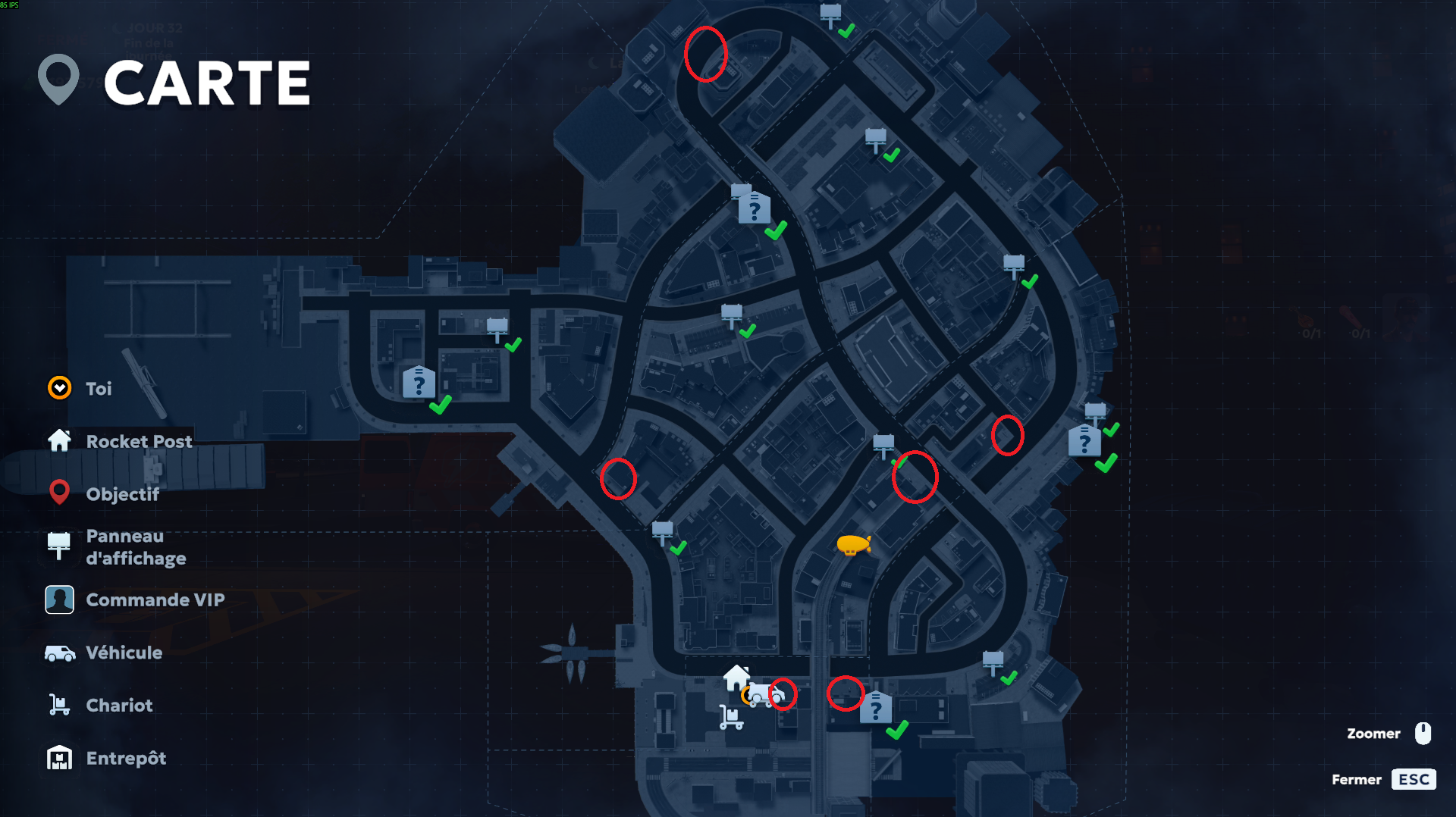
Image credit: [0-2]
Interact with Eddie
Talk to Eddie, the jack of all trades, who has his own van.
Learn About the QuickBox Threat
Receive a warning about QuickBox’s blimp with a powerful transmitter that can disrupt robot navigation. Bring gadgets to Marcus to break it.
Deliver Tech to Marcus
Deliver the required tech gadgets to Marcus.
Advance to the Next Day
Proceed to the next day to receive new VIP orders.
Review New VIP Orders
- Deliver flowers to the accident scene near Crest View Supermarket (Bobby)
- Bring gnomes to the courtyard (Harper Moore)
- Deliver headphones to Nathan Gleman
Hire the Restocker Robot
With $8,000 available, hire the restocker robot.
Assign the Restocker Robot
Assign the robot to restock shelves automatically.
Purchase Wholesale Shelves
Buy additional wholesale shelves to expand storage capacity.
Place Shelves
Place the purchased shelves in the store.
Complete VIP Order: Gnomes
Deliver gnomes to the courtyard for Harper Moore.
Complete VIP Order: Headphones
Deliver headphones to Nathan Gleman.
Restock Labeling Rolls
Labeling rolls have run out; return to the store to restock them.
Stock Consumables on Dedicated Shelves
Create dedicated shelves for labels, trash bags, repair kits, and drone containers. Place 8 items per shelf.
Fulfill VIP Order: Shampoo to Laundromat
A VIP requests a couple bottles of shampoo delivered to the laundromat.
Fulfill VIP Order: Electric Unicycle
Luna Vex requests an electric unicycle for a review video.
Acquire the Engineer Robot
Purchase an engineer robot to handle repairs and fires automatically.
Deliver All Pending Orders
Before making more upgrades, deliver all items in the truck, including VIP orders.
Hack the Airship
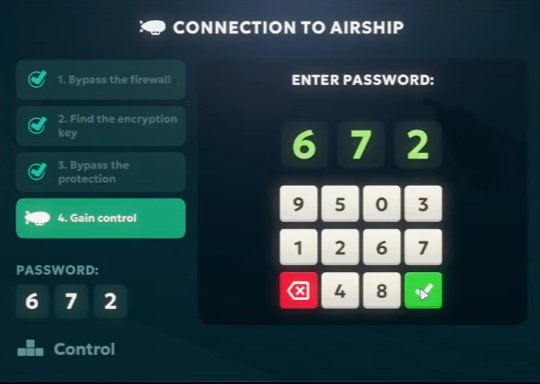
Grab the tablet from the stack of boxes by the stairs.
This walkthroug is still WIP, and I will finish it tomorrow.