

This guide provides a ready-to-use How Many Dudes? save file with Gold Star progression unlocked up to Tier 3. I also cover the exact install path, the Steam Cloud setting you must change first, and the safety steps to protect your existing progress.
I put this together after finishing every Gold Star the hard way and realizing some players just need a recovery option after a corrupted profile. One important caveat before you download anything: because my own achievements were already unlocked before I generated this file, I can’t guarantee they’ll trigger for you. Treat this as a last resort, not a shortcut.
Read This Before Downloading
How Many Dudes? is genuinely fun, and the Gold Star grind is the best part of the experience. The satisfaction of clearing each tier yourself is worth the occasional frustration. I’d strongly recommend earning them legitimately first.
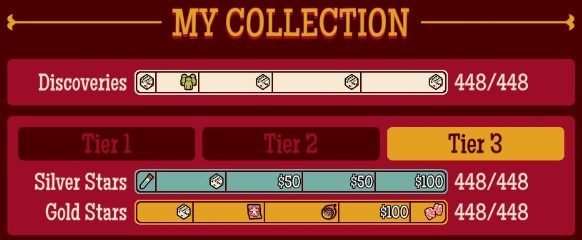
This file exists for one specific scenario: your save got corrupted or deleted and you don’t want to start from zero.
Editor Warning: I cannot confirm whether this save file will unlock any achievements for you. My achievement set was already complete before this file was created, which means the unlock flags may not re-trigger on a fresh account. Back up your current save files before touching anything.
Step 1 — Disable Steam Cloud for How Many Dudes?
The single most common mistake is skipping this step. If Steam Cloud is active, it will overwrite your replaced file on the next sync and undo the whole process.
- Open your Steam Library and right-click How Many Dudes?.
- Select Properties.
- Go to the General tab.
- Toggle Steam Cloud off.
Only proceed once Cloud synchronization is disabled.
Step 2 — Download and Extract the Save File
The archive is hosted on Google Drive and needs to be unzipped before use.
| Resource | Type | Action Required | Editor Rating |
|---|---|---|---|
| Tier 3 Gold Star Save | Zipped save file | Disable Steam Cloud, extract, then overwrite | Essential |
Download link: Google Drive
Step 3 — Locate Your Save Folder
Before you replace anything, copy your current save folder somewhere safe. This is your rollback if the file doesn’t behave as expected.
The default save directory for How Many Dudes? on Windows is:
C:\Users\<Your User Name>\AppData\Local\HowManyDudes\76561198120188609\
Editor Warning: The AppData folder is hidden by default in File Explorer. Enable View > Hidden items or paste the path directly into the address bar. The long numeric folder name is your Steam ID — it will match your own account, not necessarily the one shown here.
Step 4 — Replace and Verify
Extract the downloaded archive, then drop the contents into the folder path above, overwriting when prompted. Launch the game and check that Tier 3 and the associated Gold Stars appear correctly.
If something looks wrong or the game fails to load the profile, delete the replaced files and restore the backup copy you made in Step 3. Keep Steam Cloud disabled until you’ve confirmed the save is stable — re-enabling it too early is the fastest way to lose the file again.
Conclusion
Use this only as recovery after a loss, not as a way to skip the climb. The tiers are worth earning, and honestly the grind is where the game shines. If you’ve already beaten them once, though, this file saves you a rebuild.