
Finishing Lacey’s Flash Games completely doesn’t drop you back onto the minigame website the way you’d expect — the game rolls the ending credits and that’s it. If you’re the type who likes hunting down leftover secrets, that’s a frustrating dead end, because all those little games you were browsing become unreachable the moment the story wraps up.
Rather than tell you to replay the whole thing from the start just to poke around the site again, I put together a pair of save files that drop you back in. So here’s what I made, what each one does, and how to install them without wrecking your existing progress.
Pick Your Version First
There are two separate options, and you only want one of them. The first puts you back on the minigame website, but Jay’s games stay locked — that’s just how the story gates them. The second also returns you to the site, except this time Jay’s games are unlocked and playable.
That second version does come with a trade-off I need to flag. Once it restores Jay’s content, four games won’t be available anymore: Lacey’s House Makeover, Maisie’s School Escape, Lacey’s Makeup Parlour, and Lacey’s Nursery. So decide which set of games matters more to you before you copy anything over. If you want Jay’s stuff, you accept losing those four; if you’d rather keep them, take the version without Jay.
Downloading the Files
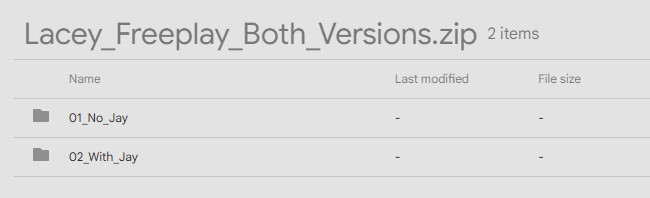
Grab the save pack here: Download Save Files (Google Drive). It’s a ZIP archive, and inside you’ll find two folders — 01_No_Jay for the version without Jay’s games, and 02_With_Jay for the version that includes them. Again, choose a single folder; don’t merge them.
Installing the Save Files
Close the game fully before touching anything. Then press Win + R to open the Run box, type %APPDATA%\Godot, and hit enter. Inside that location, open the Lacey’s Flash Games folder — that’s where the game keeps your save data.
Before you go any further, back up your original save folder. Copy it somewhere safe. I’m serious about this step, because you’re about to overwrite files and you’ll want that safety net if something goes sideways.
Now open the downloaded ZIP, pick the version you decided on, and copy both sg.res and sg.res.bak into the game’s save folder, letting them replace the files already there. Launch the game and you’re back on the minigame site.
If anything misbehaves after the swap, close the game and drop your original save files back in from the backup you made. These saves exist for players who already finished Lacey’s Flash Games and just want to keep digging for secrets afterward, so if you hit a snag, leaving a comment helps sort it out.