

If your achievements in DEATH PENALTY simply refuse to pop, you are not imagining it — mine were completely dead too, while a handful of other players reported everything working fine. This is the fix that finally got them firing again, and given how few of us are running this game on Linux, I figured it was worth writing down properly for anyone else stuck in the same hole.
What I want to stress up front is that this is an edit to the game’s own files, not a setting buried in Steam. It is a small, reversible change, and it comes down to a plugin conflict plus one missing pair of quotation marks. I went looking for a reason why it worked rather than just blindly ticking a box, and the explanation actually holds together.
Why Achievements Are Breaking
Two Steamworks plugins are loaded at the same time and effectively fight each other, which leaves the achievement calls stranded. Once you switch one of them off, the other — OrangeGreenworks — is free to do its job again.
The second half of the problem is an honest typo in the game’s data. One achievement call is written without the quotation marks around its argument, so it never activates correctly. Fixing that single character pair is what lets REMEMBERED actually register.
I know the Linux angle is a small club, but that was my situation, so if you happen to be in the same boat it is worth trying before you write your achievements off.
Disabling the Cyclone-Steam Plugin
Start by getting into the game’s install folder and finding the file that loads the plugins. The setting you are changing is a simple boolean toggle, so read the line before you touch it.
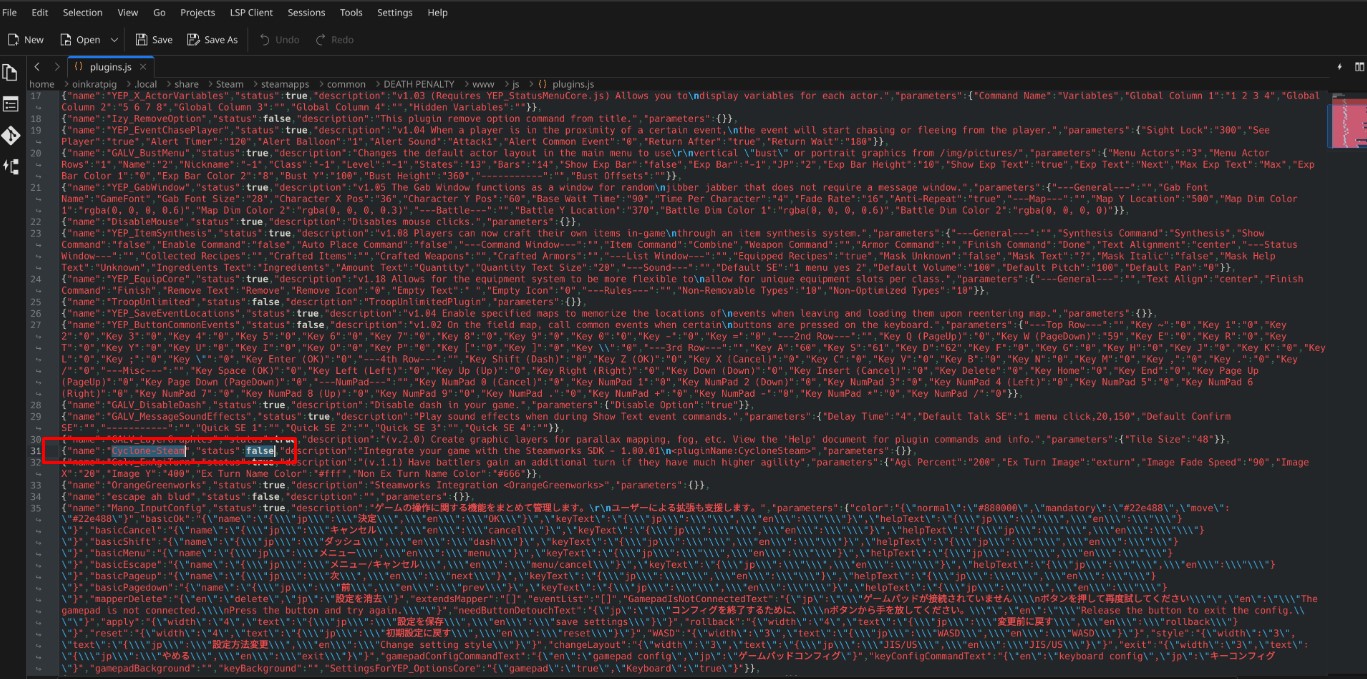
Image credit: oinkratpig
- Open the game’s folder.
- Go into the www folder.
- Go into the js folder.
- Open plugins.js in Notepad or any other plain text editor.
- Press Ctrl+F and search for Cyclone-Steam, then set it to false to deactivate it.
Fixing the Missing Quotation Marks
With the plugin out of the way, the remaining job is patching the typo in the map data. This is the step that is easy to skim past, so open the file and read the line carefully before editing — the difference between a working call and a broken one is only a pair of quote marks.
- Navigate back to the www folder, then open the data folder.
- Open Map129.json in Notepad or another text editor.
- Search for OrangeGreenworks.activateAchievement.
- If you find OrangeGreenworks.activateAchievement(REMEMBERED), change it to OrangeGreenworks.activateAchievement(‘REMEMBERED’) — the quotes inside the parentheses are what matter.
- Save the file. That is the whole fix.
Conclusion
Two small edits and your achievements should be back in business. If yours were already behaving, count yourself lucky and leave the files alone — but for anyone whose counter stayed frozen, this is the one I would try first.